Chapter 10 SPC Charting with qicharts2
qicharts2 (Quality Improvement Charts, Anhøj (2024), Anhøj (2018)) is an R package for statistical process control aimed primarily at healthcare data analysts. It is built on the same principles that we have developed throughout this book and provides functions for constructing run charts and all of the Magnificent Seven. In addition, it includes specialised charts such as Pareto charts and control charts for rare events data.
Full documentation and examples are available on the package website: https://anhoej.github.io/qicharts2/. In this chapter, we focus on a few key features that extend the functionality of the simple function library we developed earlier:
- excluding data points from analysis
- freezing and splitting charts by periods
- multivariate plots (small multiples)
To get started, install and load the package:
Note that installation is only required once, whereas the package must be loaded in each R session.
You may also wish to explore the vignette: vignette('qicharts2').
Alternatively, you can begin using the package immediately.
10.1 A simple run chart
The main function of qicharts2 is qic(). It accepts the same core arguments as the spc() function developed earlier, along with many additional options. For a full overview, consult the documentation: ?qic.
To reproduce our first run chart from Chapter 5:
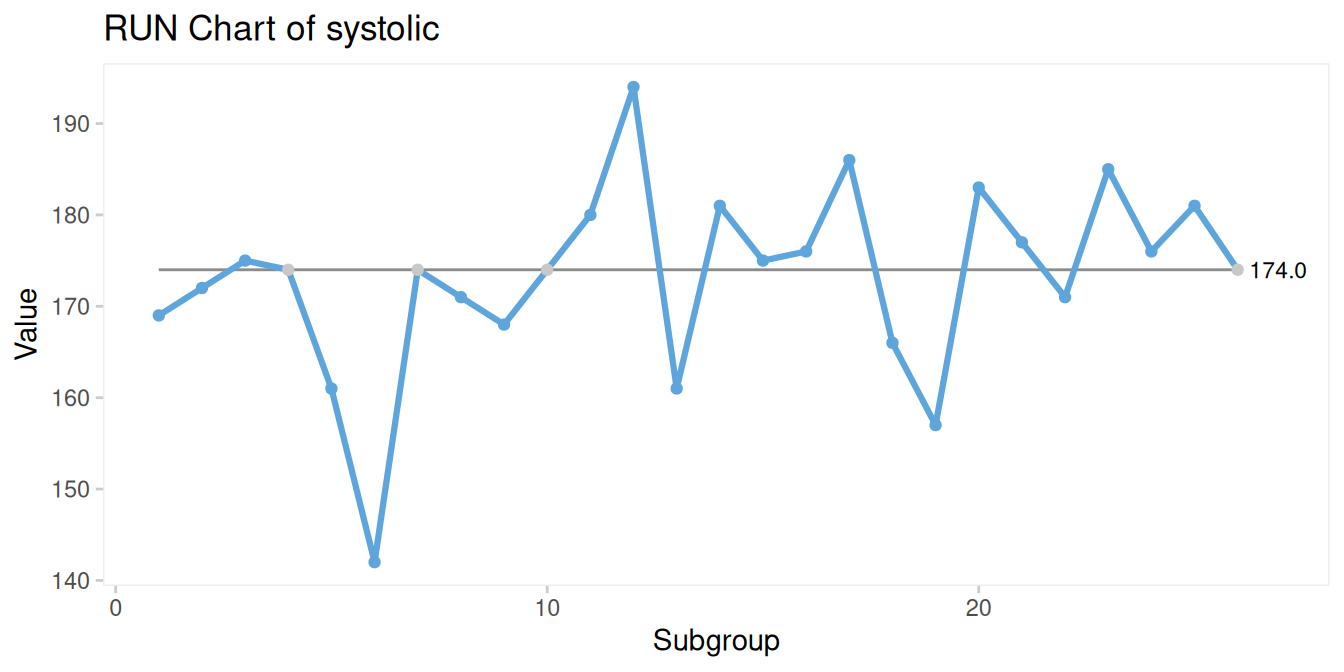
Figure 10.1: Run chart produced with the qic() function from the qicharts2 package
Several features are worth noting in Figure 10.1. Default titles and axis labels are generated automatically, though these can be modified using the title, ylab, and xlab arguments. Data points that fall exactly on the centre line are displayed in grey, reflecting that they are not counted as useful observations in runs analysis. The value of the centre line is also displayed directly on the chart.
10.2 A simple control chart
To produce a control chart, we simply specify the chart type (Figure 10.2):
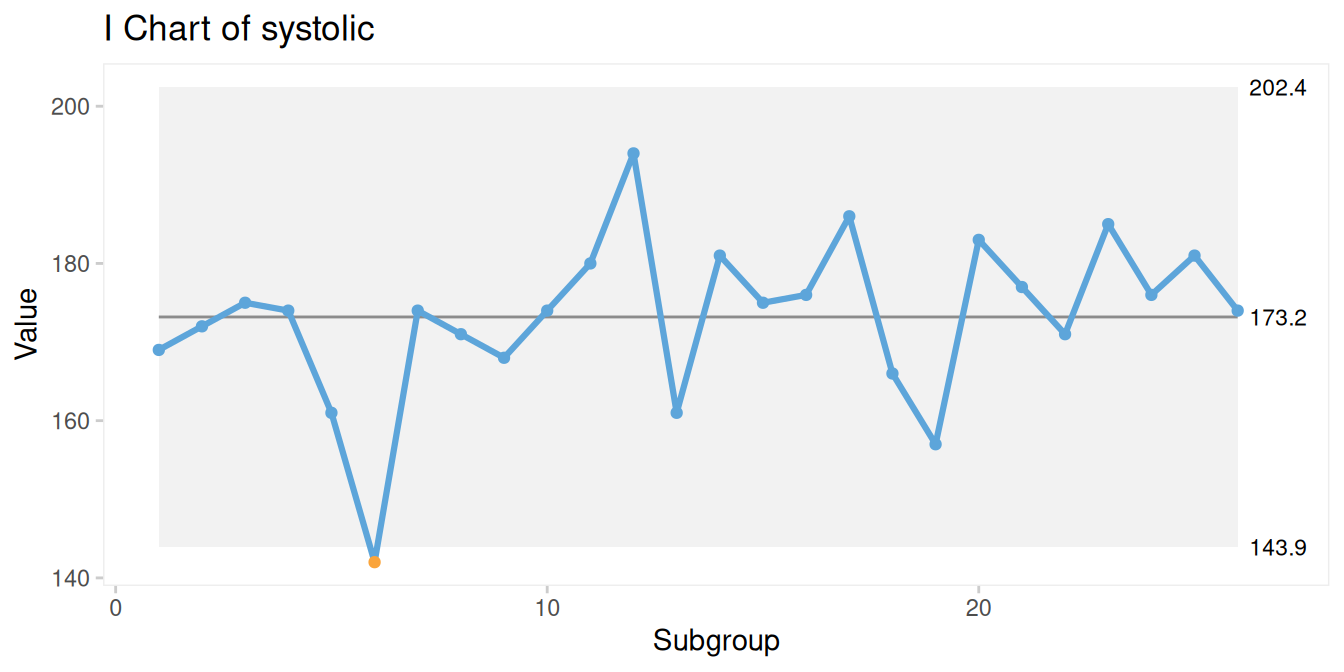
Figure 10.2: I chart produced with qic()
By default qic() uses a grey background area to show the natural process limits.
10.3 Excluding data points from analysis
In some situations, it may be appropriate to exclude specific data points from the calculation of control limits and runs analysis. This is done using the exclude argument (Figure 10.3):
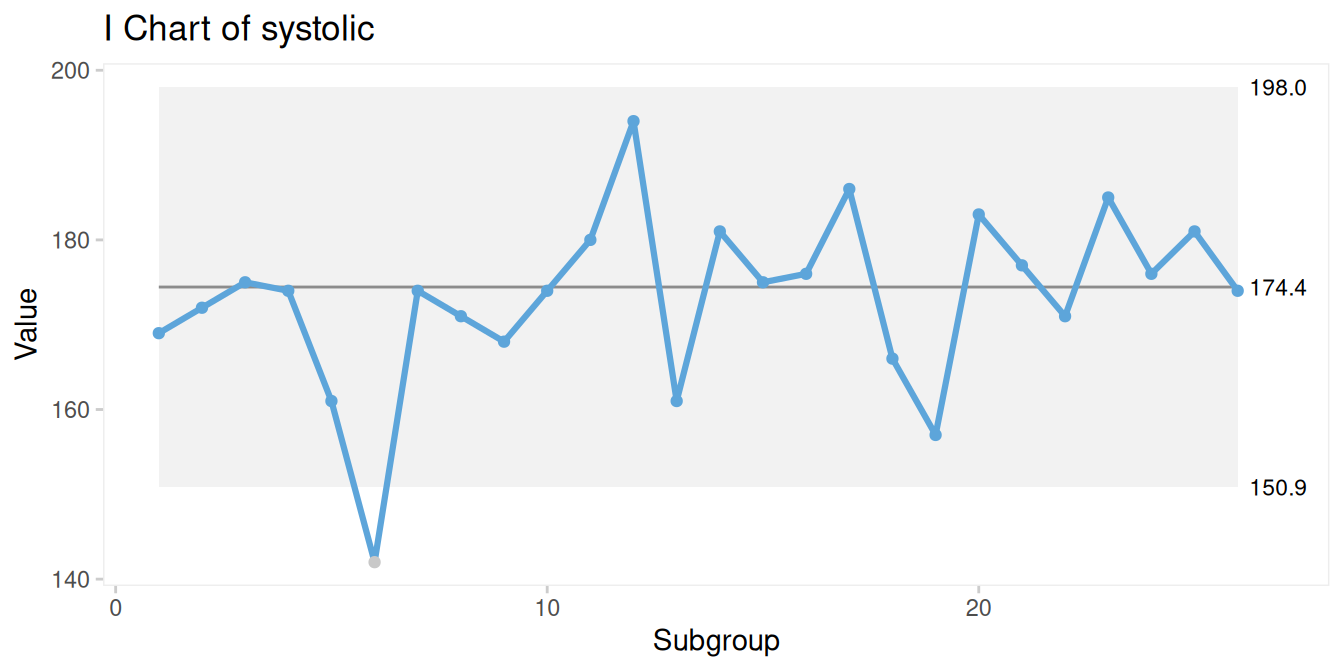
Figure 10.3: I chart with one data point excluded from calculations
Excluding a data point affects the estimated centre line and control limits – in this example, the limits become slightly narrower.
Such exclusions should be made deliberately and only when there is a clear understanding of why the data point does not represent the underlying process. Excluding points simply because they fall outside the control limits undermines the purpose of SPC, which is to learn from variation.
10.4 Freezing baseline period
When a stable baseline has been established, it is often useful to “freeze” the centre line and control limits and apply them to future data. In industrial settings, this is known as phase I and phase II analysis.
In healthcare, freezing is particularly useful when evaluating the impact of an intervention. The cdi dataset, included with qicharts2, contains monthly infection counts before and after an improvement programme:
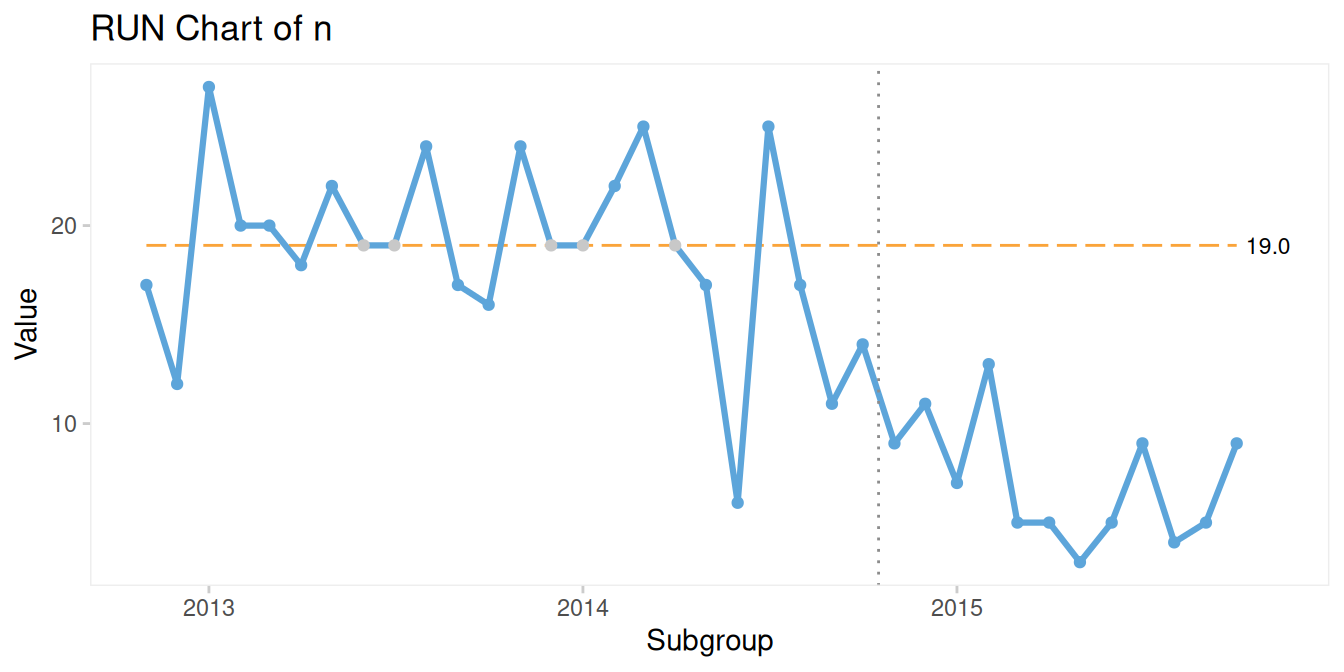
Figure 10.4: Infections before and after intervention
In Figure 10.4, the centre line is calculated from the first 24 months (the baseline period) and applied to subsequent data. This makes it easier to detect sustained changes following the intervention.
10.5 Splitting chart by period
When a sustained shift has been identified and its cause is understood, it may be appropriate to split the chart into distinct periods using the part argument (Figure 10.5):
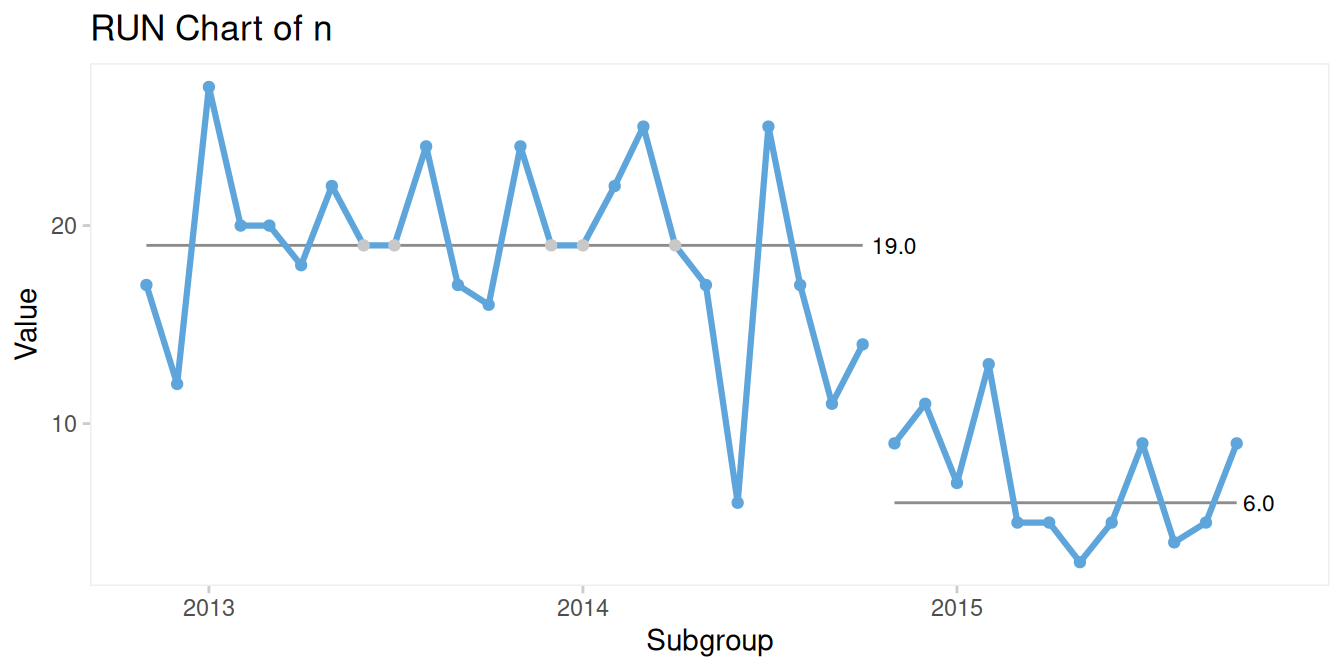
Figure 10.5: Splitting using index
Alternatively, a categorical variable can be used to define periods(Figure 10.6):
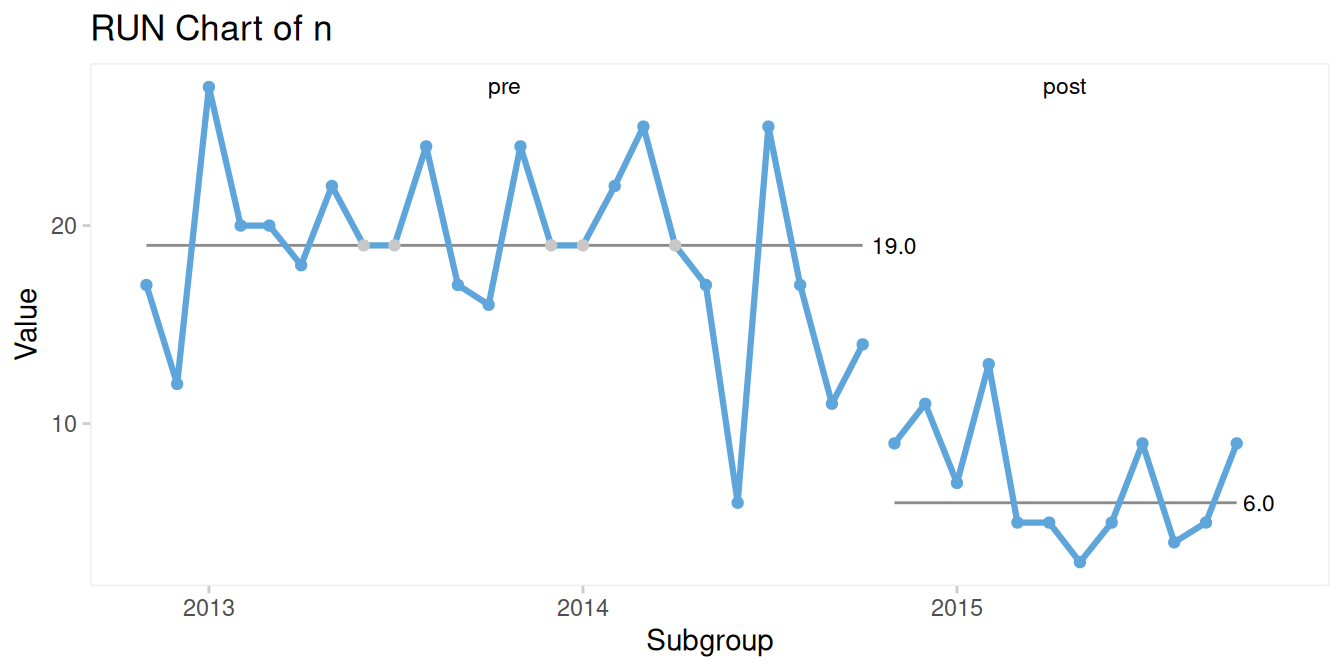
Figure 10.6: Splitting using a period variable
Splitting should be done cautiously and only when justified. It is typically appropriate when:
- a sustained shift is present
- the cause of the shift is known
- the shift is in the desired direction
- the new level is expected to persist
If these conditions are not met, the focus should remain on understanding the underlying causes of variation.
Once distinct stable periods have been identified, control limits may be added: (Figure 10.7).
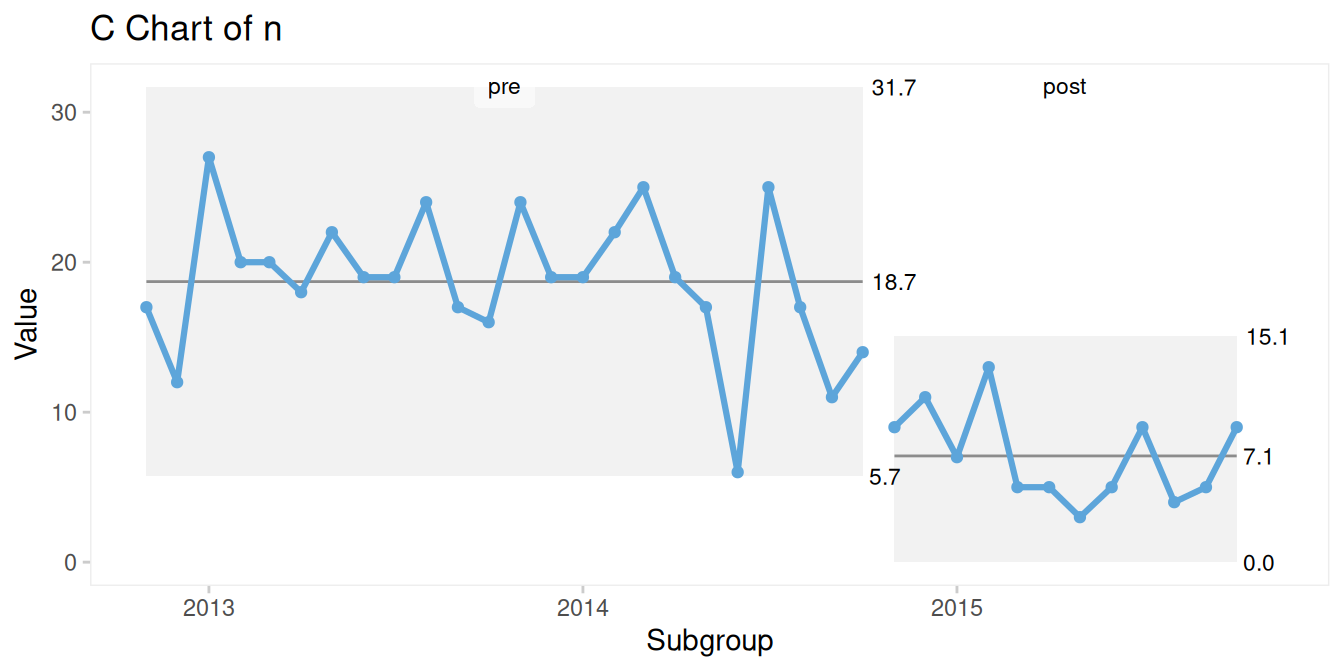
Figure 10.7: Splitting using a period variable
10.6 Small multiple plots for multivariate data
While SPC charts are inherently time-based, many healthcare datasets include additional dimensions that are important for interpretation.
The hospital_infections dataset, included in qicharts2, contains infection counts by hospital and infection type:
##   hospital infection      month  n     days
## 1      AHH       BAC 2015-01-01 17 17233.67
## 2      AHH       BAC 2015-02-01 18 15308.25
## 3      AHH       BAC 2015-03-01 17 16883.67
## 4      AHH       BAC 2015-04-01 10 15463.83
## 5      AHH       BAC 2015-05-01 13 15788.96
## 6      AHH       BAC 2015-06-01 14 15660.04
In addition to time, the data vary by hospital and infection type.
Figure 10.8 shows aggregated data for urinary tract infections across all hospitals:
qic(month, n, days,
    data     = subset(hospital_infections,
                      infection == 'UTI'),
    chart    = 'u',
    multiply = 10000,
    title    = 'Urinary tract infections',
    ylab     = 'Count per 10,000 risk days',
    xlab     = 'Month')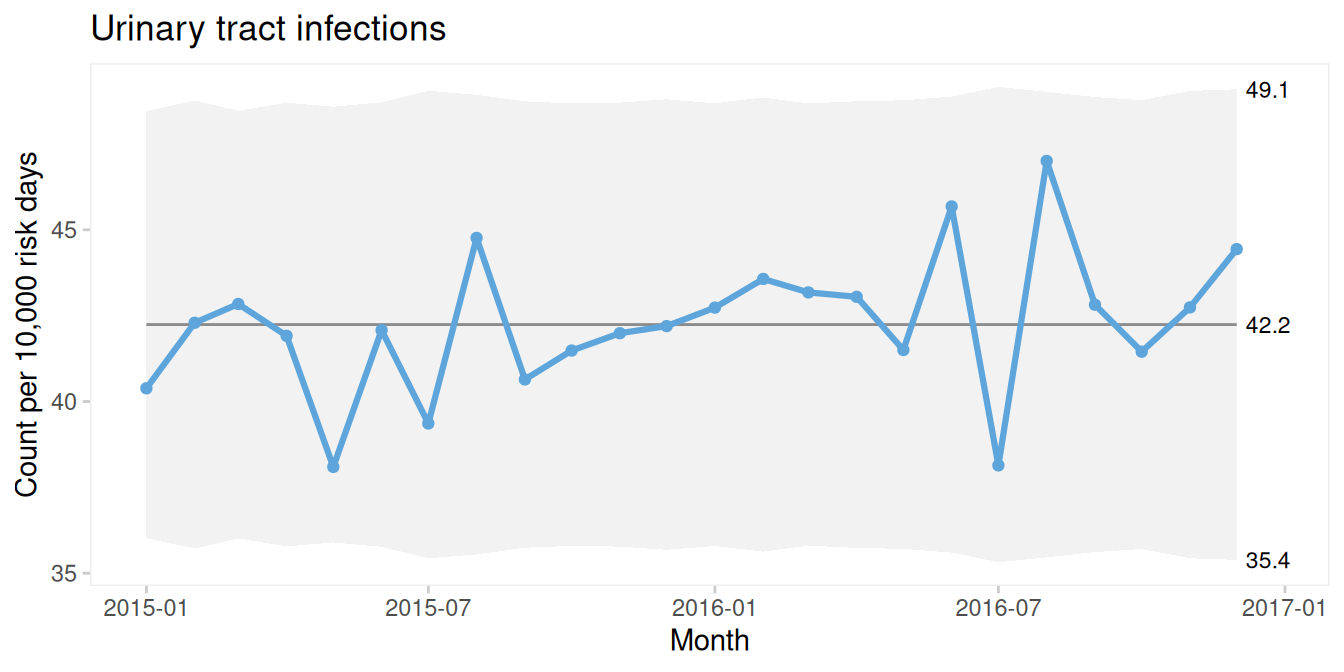
Figure 10.8: Aggregated U chart of urinary tract infections from six hospital
The same data can be stratified into separate panels using the facets argument (Figure 10.9):
qic(month, n, days,
    data     = subset(hospital_infections,
                      infection == 'UTI'),
    chart    = 'u',
    multiply = 10000,
    facets   = ~hospital,                     # stratify by hospital
    ncol     = 2,                             # two-column arrangement of plots
    title    = 'Urinary tract infections',
    ylab     = 'Count per 10,000 risk days',
    xlab     = 'Month')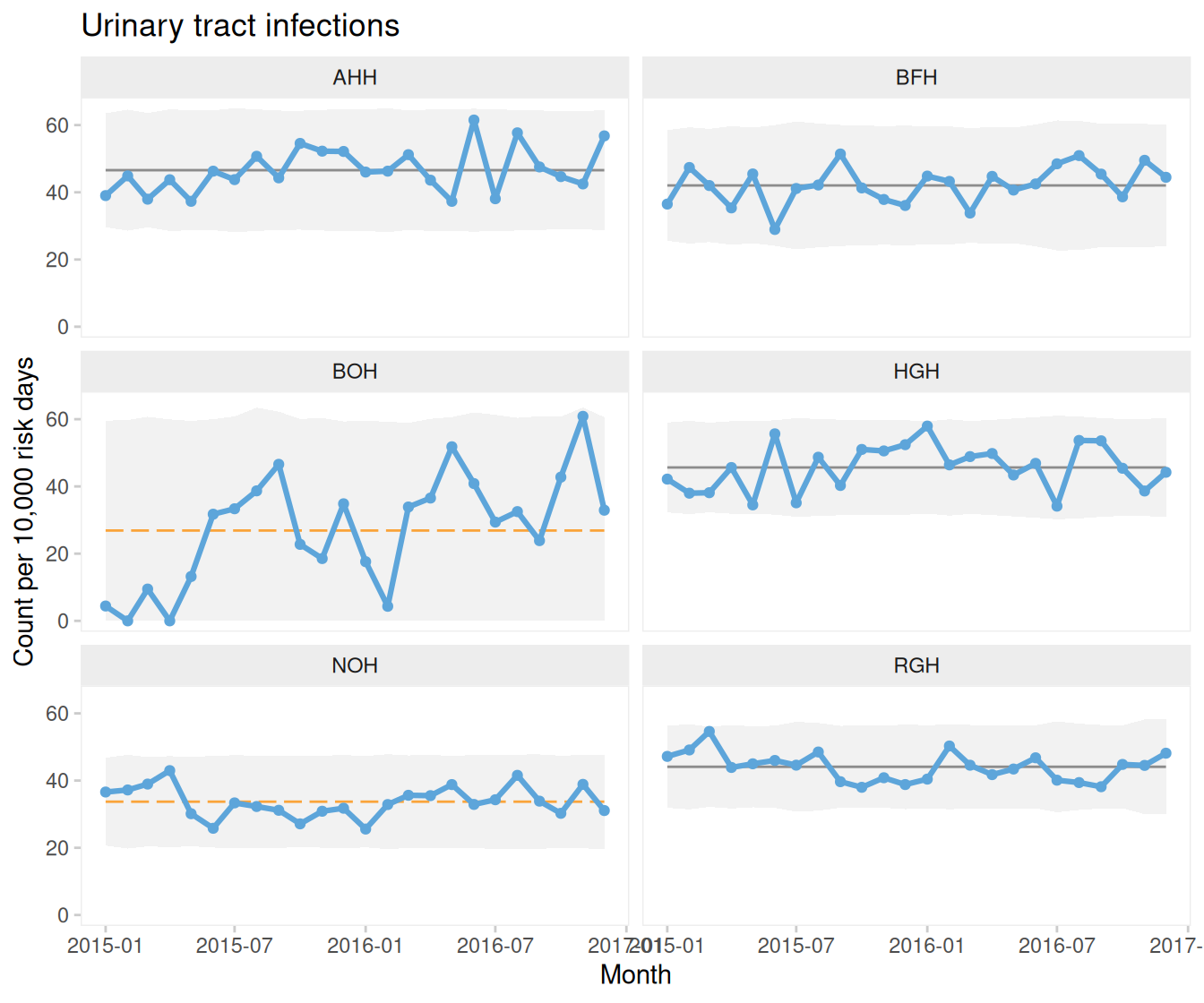
Figure 10.9: Stratified (small multiple) U charts of urinary tract infections from six hospital
These small multiple plots (also known as trellis or lattice plots) allow comparison across categories.
Similarly, we can stratify by infection type within a single hospital: (Figure 10.10).
qic(month, n, days,
    data     = subset(hospital_infections,
                      hospital == 'NOH'),
    chart    = 'u',
    multiply = 10000,
    facets   = ~infection,                   # stratify by infection type
    ncol     = 1,
    title    = 'Hospital infections',
    ylab     = 'Count per 10,000 risk days',
    xlab     = 'Month')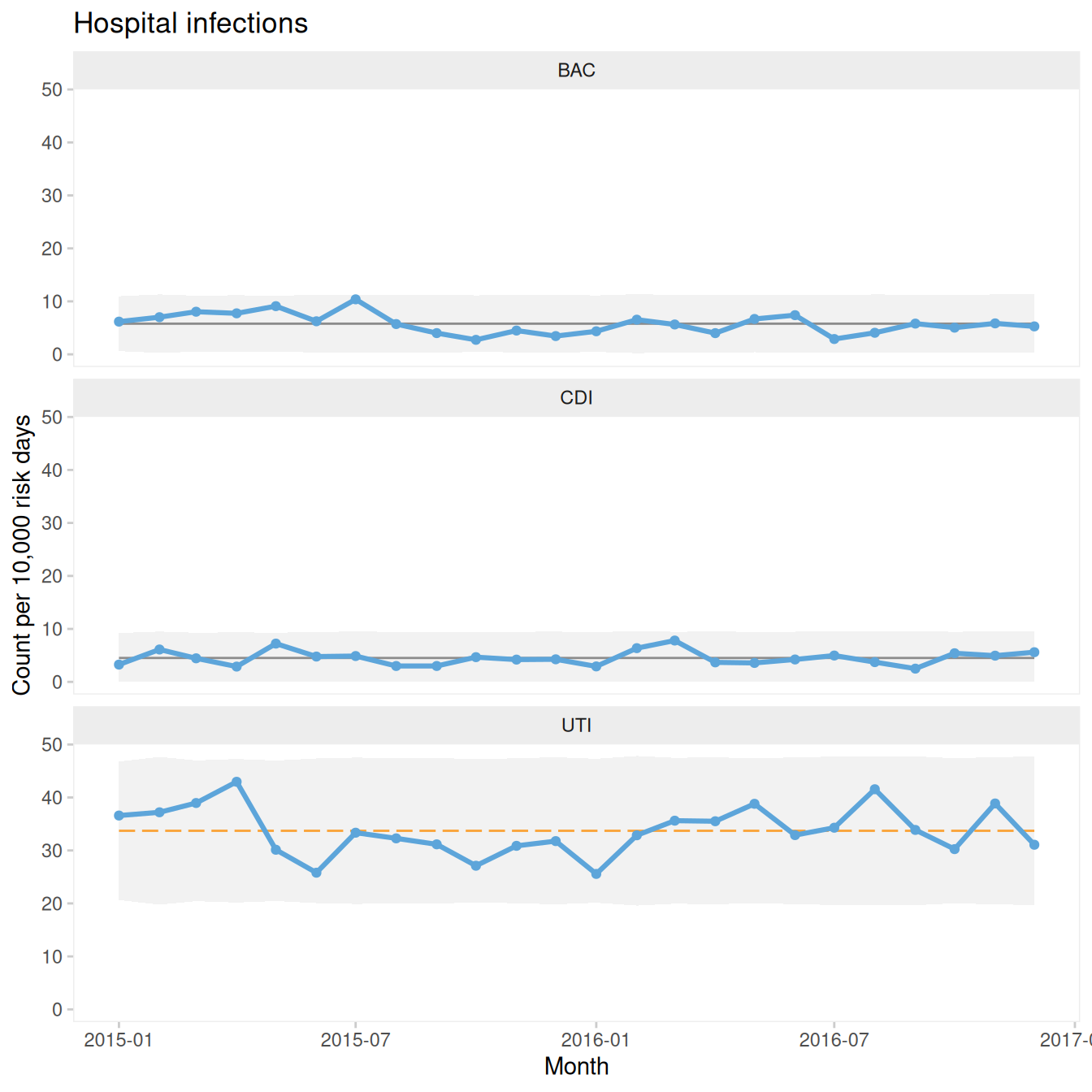
Figure 10.10: U charts from one hospital stratified by infection type
By default, all panels share the same axis scales. This facilitates comparison of levels and patterns. However, when indicators differ greatly in magnitude, it may be more useful to allow separate scales as in Figure 10.11:
qic(month, n, days,
    data     = subset(hospital_infections, hospital == 'NOH'),
    chart    = 'u',
    multiply = 10000,
    facets   = ~infection,
    scales   = 'free_y',                      # free y-axes
    ncol     = 1,
    title    = 'Hospital infections',
    ylab     = 'Count per 10,000 risk days',
    xlab     = 'Month')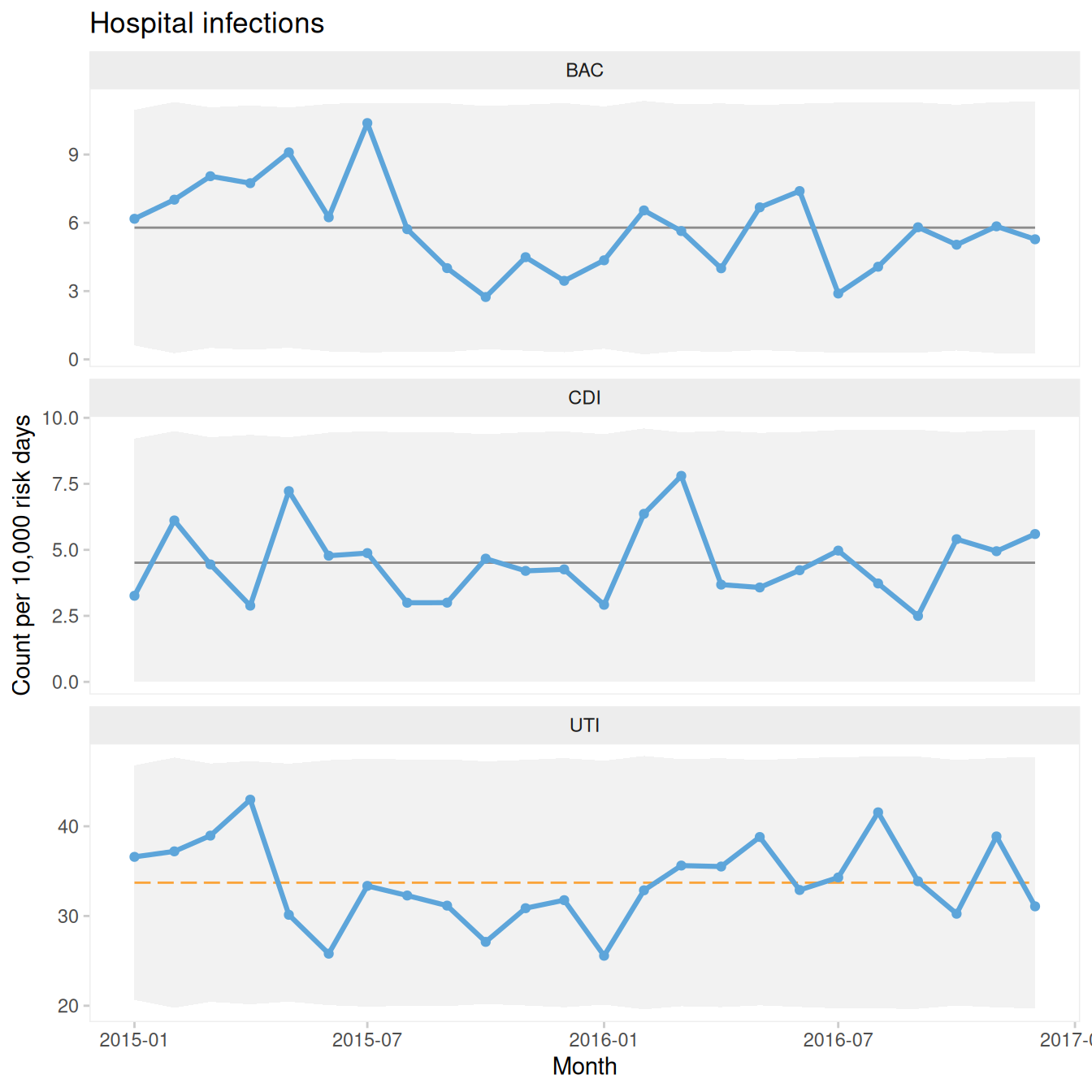
Figure 10.11: Small multiples free y-axes
Finally, both dimensions can be displayed simultaneously as in Figure 10.12:
qic(month, n, days,
    data     = hospital_infections,
    chart    = 'u',
    multiply = 10000,
    facets   = infection ~ hospital,         # two-dimensional faceting
    scales   = 'free_y',
    title    = 'Hospital infections',
    ylab     = 'Count per 10,000 risk days',
    xlab     = 'Month')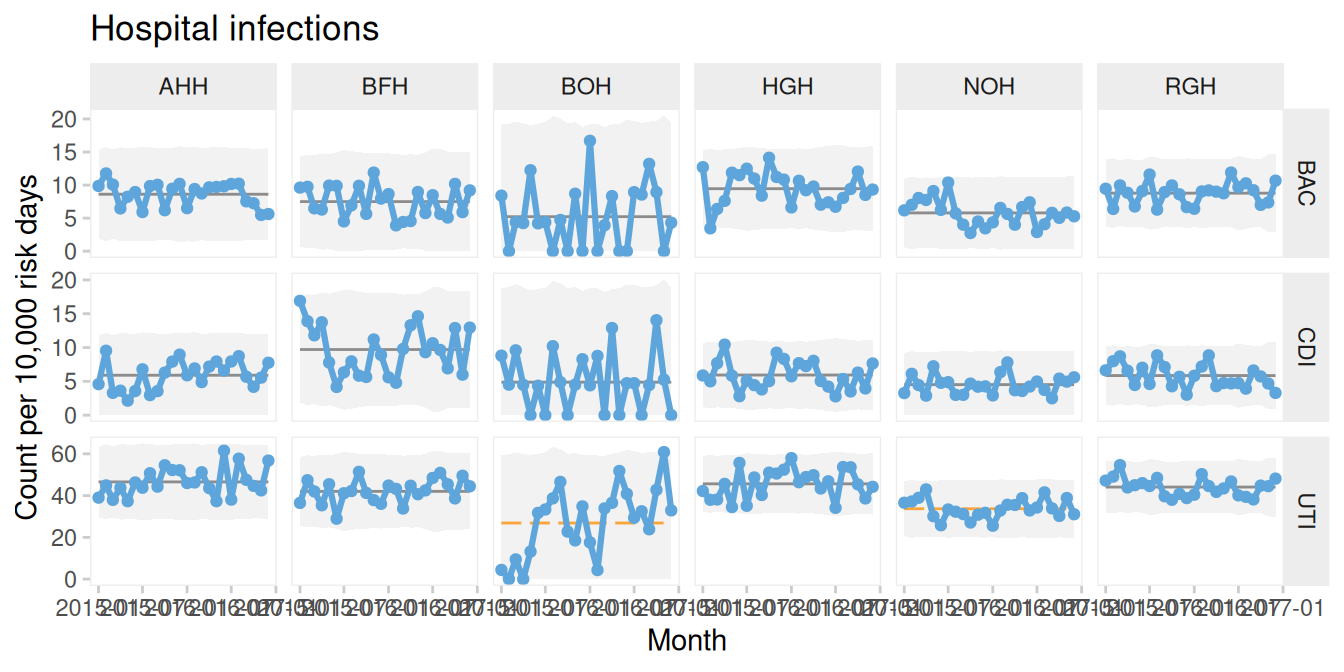
Figure 10.12: Hospital infections stratified by infection and hospital
10.6.1 To aggregate or not to aggregate
When working with data from multiple organisational units, a key decision is whether to aggregate or stratify.
Aggregation can simplify interpretation but may mask important variation. In contrast, stratification can reveal differences between units that would otherwise be hidden. For example, aggregated data may appear stable even when individual units exhibit shifts in opposite directions.
Conversely, small shifts occurring consistently across multiple units may become more visible when data are aggregated.
The choice between aggregation and stratification should therefore be made deliberately, based on an understanding of the context and purpose of the analysis. In many cases, it is useful to examine the data at multiple levels.
10.7 qicharts2 in short
qicharts2 is a flexible and powerful package for constructing SPC charts, particularly in healthcare settings. It builds on the same principles introduced in this book while providing additional functionality for automation, visualisation, and handling of complex data structures.
In the following chapters, we will explore specialised chart types and further extensions of SPC methodology.