Chapter 5 Your First SPC Charts With Base R
From Part 1 of this book, we now have a good understanding of what SPC is and how SPC charts work. In this chapter, we begin constructing SPC charts using functions from base R. In later chapters, we will introduce functions from ggplot2 and qicharts2 (an R package developed by JA).
At its core, an SPC chart is a point-and-line plot of data over time, with a horizontal line representing the centre of the data and – when constructing a control chart – two additional lines representing the estimated upper and lower bounds of natural variation.
5.1 A run chart of blood pressure data
Consider the data from Figure 2.1, which show systolic blood pressure measurements (mm Hg) for a patient recorded each morning over 26 consecutive days (Mohammed et al. 2008).
systolic <- c(169, 172, 175, 174, 161, 142,
              174, 171, 168, 174, 180, 194,
              161, 181, 175, 176, 186, 166,
              157, 183, 177, 171, 185, 176,
              181, 174)
We begin by plotting a simple point-and-line chart without any additional reference lines (Figure 5.1):
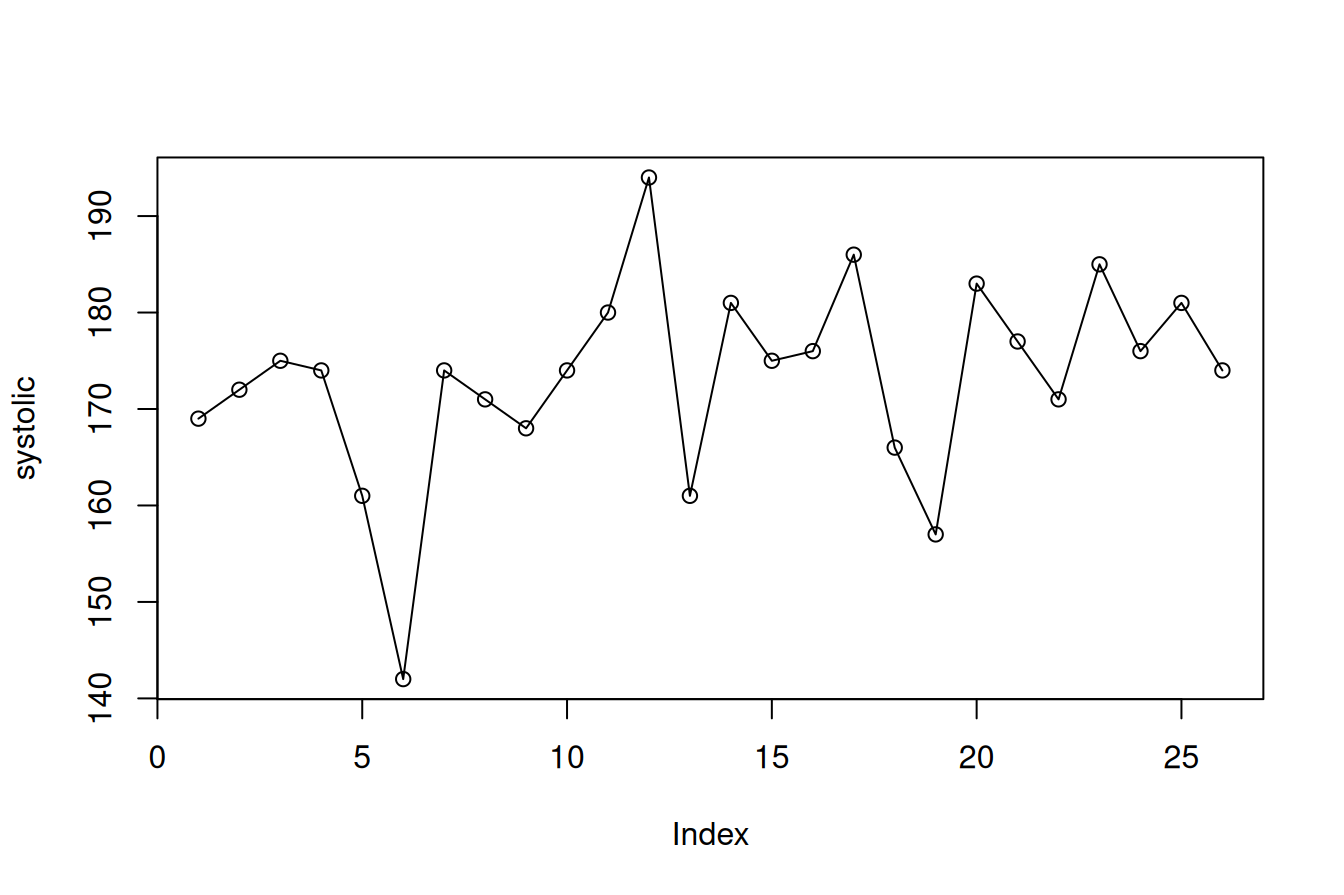
Figure 5.1: Simple run chart
(As a side note, this reminds me (JA) of a manager, who once said to me: “You make such beautiful graphs, but can’t you stop them from going up and down all the time.”)
To support runs analysis, we add a horizontal centre line. In a run chart, this is typically the median of the data (Figure 5.2):
# Create systolic-coordinates for the centre line
cl  <- median(systolic)           # calculate median
cl  <- rep(cl, length(systolic))  # repeat to match the length of y

# Plot data and add centre line
plot(systolic, type = 'o')
lines(cl)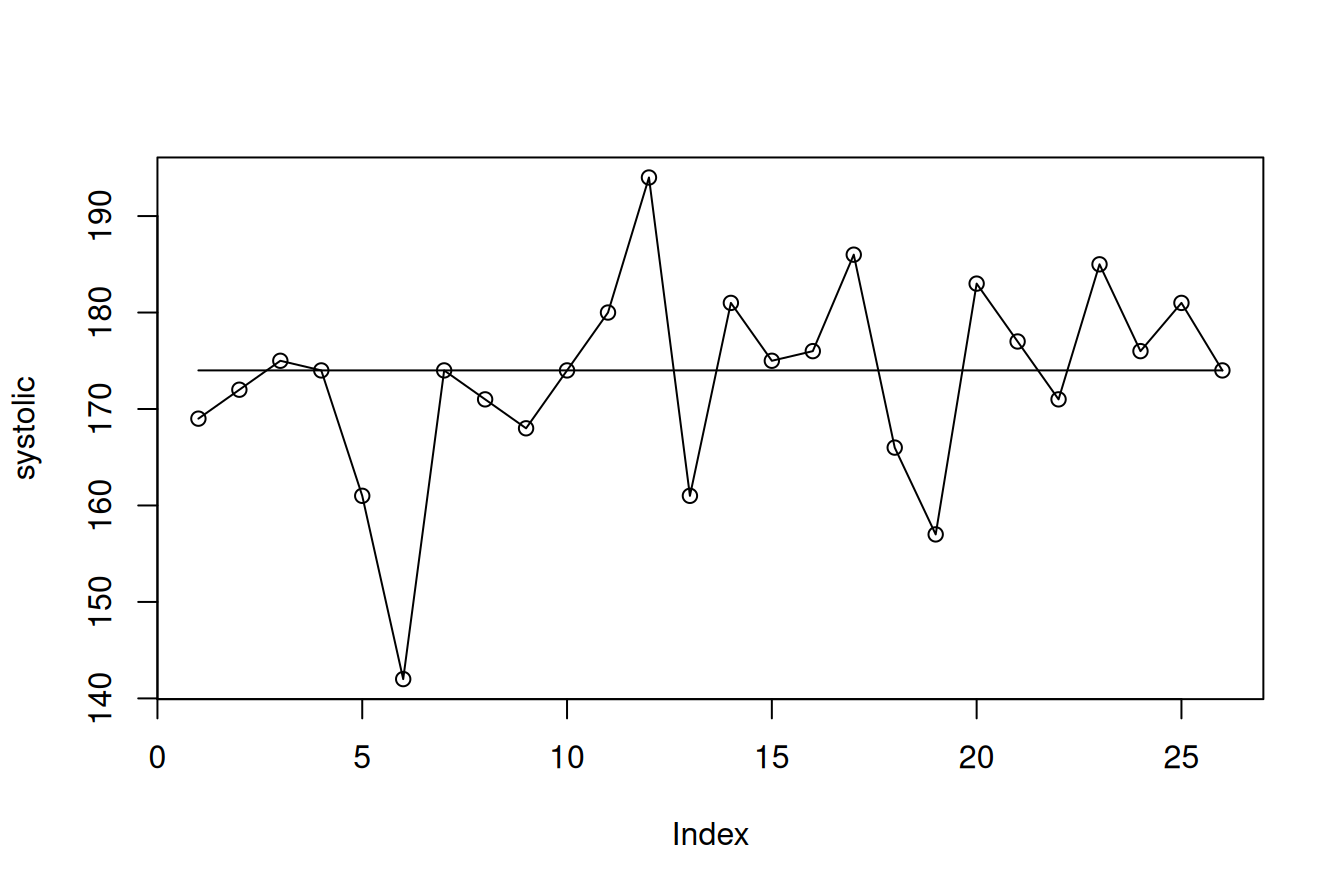
Figure 5.2: Run chart with centre line
From the chart, we observe that the longest run consists of four data points (#14-#17), and the data cross the centre line nine times. Four observations (#4, #7, #10, #26) lie exactly on the centre line, leaving 22 useful observations. Using the runs rules described in Chapter 3, the upper limit for the longest run is 7, which also corresponds to the lower limit for the number of crossings. Since neither limit is exceeded, there is no evidence of sustained shifts or trends in the data.
5.2 Adding control limits to produce a control chart
We now extend the run chart by adding control limits to produce a control chart.
Recall that control limits are typically defined as CL ± 3SD, where the centre line (CL) is usually the mean, and the standard deviation (SD) represents the natural variation in the process. Importantly, this is not the overall standard deviation of all observations, but an estimate based on common cause variation.
For individual measurements, we use an I chart (see Chapter 2). In this case, the process standard deviation is estimated from the average moving range divided by a constant (1.128). The moving ranges are the absolute differences between consecutive observations. This will be explained in more detail in Chapter 6.
# Calulate the centre line (mean)
cl  <- rep(mean(systolic), length(systolic))

# Calculate the moving ranges of data
mr <- abs(diff(systolic))

# Print the moving ranges for our viewing pleasure
mr
## [1] 3 3 1 13 19 32 3 3 6 6 14 33 20 6 1 10 20 9 26 6 6 14 9 5 7# Calculate the average moving range
amr <- mean(mr)
# Calculate the process standard deviation
s <- amr / 1.128
# Create y-coordinates for the control limits
lcl <- cl - 3 * s
ucl <- cl + 3 * sWhen plotting the chart, we must ensure that the y-axis accommodates both the data and the control limits (Figure 5.3):
# Plot data while expanding the y-axis to make room for all data and lines
plot(systolic, type = 'o', ylim = range(systolic, lcl, ucl))

# Add lines
lines(ucl)
lines(cl)
lines(lcl)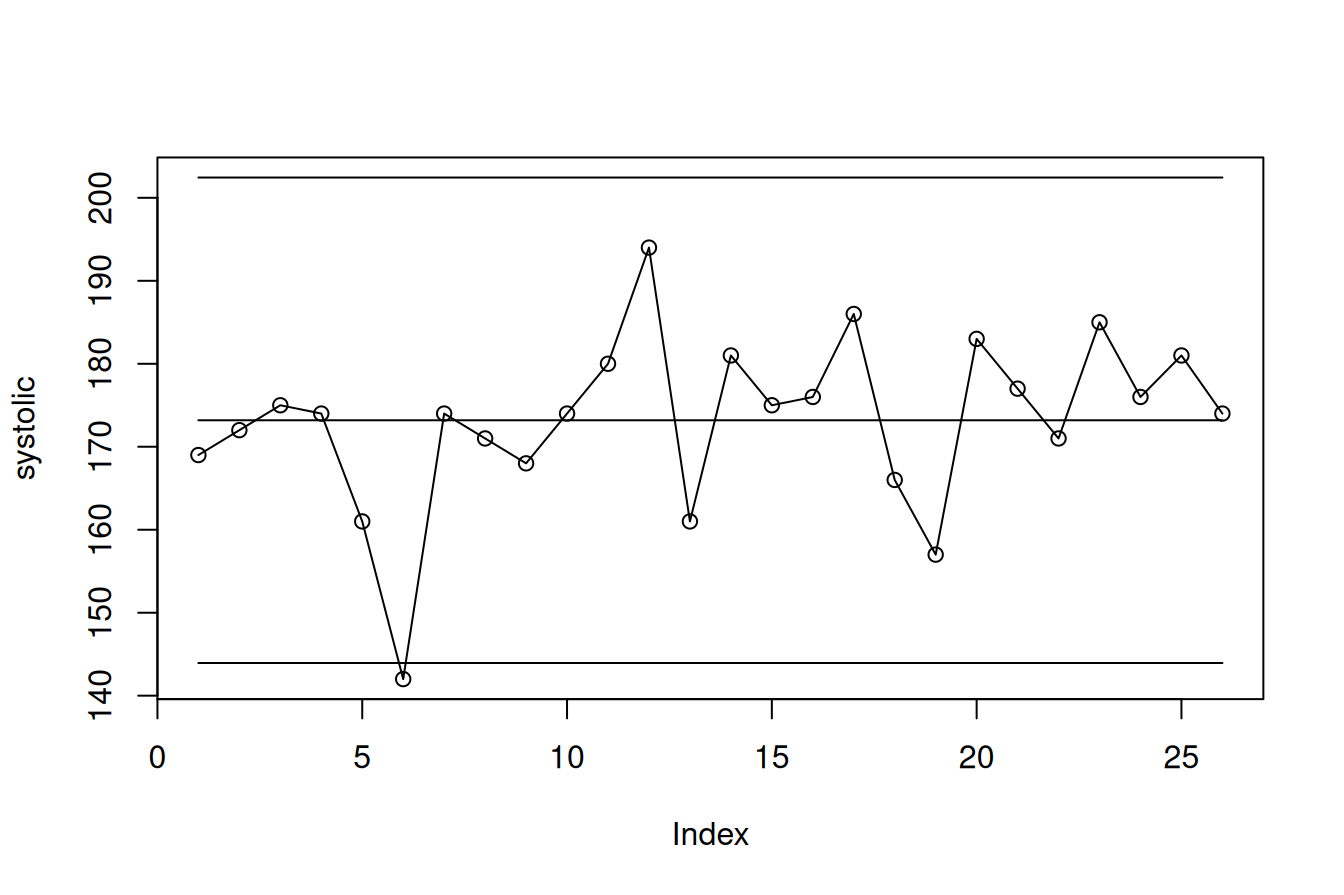
Figure 5.3: Standardised control chart
One data point falls below the lower control limit. This suggests that the observation is unlikely to be due to common cause variation alone and may reflect a special cause. The chart itself does not explain the cause, but it highlights the need for further investigation with the aim of learning and improvement.
5.3 That’s all, Folks!
Constructing an SPC chart in R requires only a few lines of code. Most of the work involves preparing the data and calculating the necessary statistics. The plotting itself follows a simple pattern: first plot the data points, then add the relevant lines.
In later chapters, we will wrap these steps into functions that automate the calculations, highlight signals of non-random variation, and produce more refined visualisations than the basic plots shown here.
In the next chapter, we turn to the construction of the most commonly used SPC charts in healthcare – the Magnificent Seven.