Chapter 6 Calculating Control Limits
In the previous chapter, we established the basic steps for constructing SPC charts in R using the I chart as an example. In this chapter, we continue with the rest of The Magnificent Seven and show how to calculate their control limits.
6.1 Introducing the spc() function
To avoid repeating the same plotting code, let us begin by creating a simple function to automate the plotting for us.
spc <- function(
    x,           # x axis values
    y   = NULL,  # data values
    cl  = NA,    # centre line
    lcl = NA,    # lower control limit
    ucl = NA,    # upper control limit
    ...          # other parameters passed to the plot() function
) {
  # if y is missing, set y to x and make a sequence for x
  if (is.null(y)) {
    y <- x
    x <- seq_along(y)
  }

  # repeat line values to match the length of y
  if (length(cl) == 1)
    cl <- rep(cl, length(y))

  if (length(lcl) == 1)
    lcl <- rep(lcl, length(y))

  if (length(ucl) == 1)
    ucl <- rep(ucl, length(y))

  # plot the dots and draw the lines
  plot(x, y,
       type = 'o',
       ylim = range(y, lcl, ucl, na.rm = TRUE),
       ...)
  lines(x, cl)
  lines(x, lcl)
  lines(x, ucl)
}
The spc() function takes five arguments, of which only the first, x, is required. If only x is supplied, a simple point-and-line chart is drawn using those values as the y-values and their sequence numbers on the x-axis. If y is also supplied, then x is used for the x-axis and y for the plotted data values.
The remaining arguments, cl, lcl, and ucl, are used for the centre line and the lower and upper control limits. These may be given either as single values or as vectors of the same length as the data. Additional graphical arguments, such as main, xlab, and ylab, may be passed on to the plot() function.
Let us test the function using the blood pressure data from Chapter 5 (Figure 6.1).
# create an x variable, not that is it necessary in this case, just because we can
day <- seq_along(systolic)

# plot data
spc(day, systolic, cl, lcl, ucl)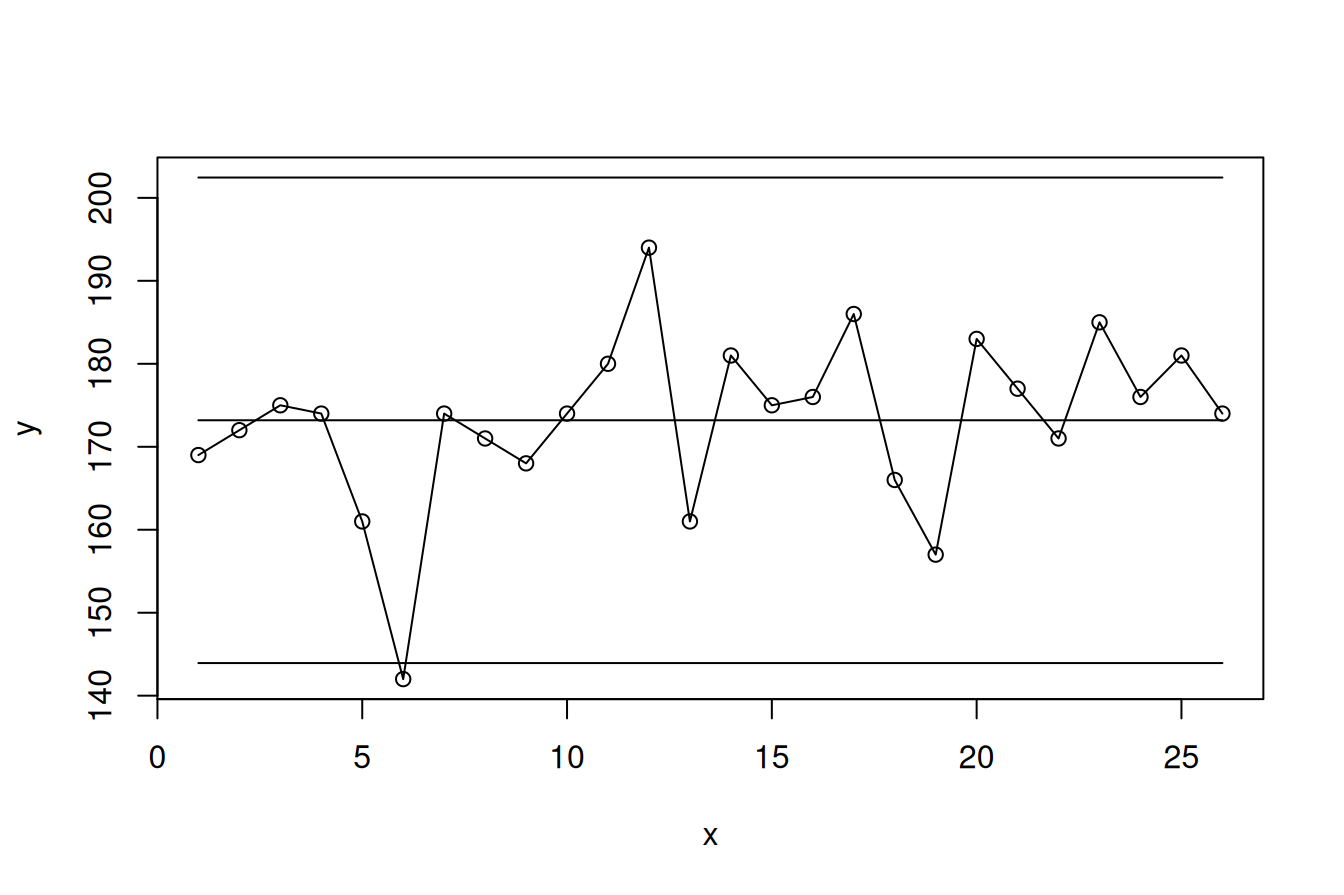
Figure 6.1: Control chart of systolic blood pressure
With this function in hand, we are now able to construct many different kinds of control charts. All we need to know is how to calculate the centre line and the control limits.
6.2 Formulas for calculation of control limits
The formulas for calculation control limits for The Magnificent Seven introduced in Chapter 2 are shown in Table 6.1. Do not be alarmed by the number of strange symbols. We will translate the formulas to R code one by one as we move through the chapter.
| Subgroups | Chart type | Control limits | Assumed distribution |
|---|---|---|---|
| Count data | |||
| Counts | C | \(\bar{c}\pm3\sqrt{\bar{c}}\) | Poisson |
| Rates | U | \(\bar{u}\pm3\sqrt{\frac{\bar{u}}{n_{i}}}\) | Poisson |
| Proportions | P | \(\bar{p}\pm3\sqrt{\frac{\bar{p}(1-\bar{p})}{n_{i}}}\) | Binomial |
| Measurement data | |||
| Individual measurements | I | \(\bar{x}\pm2.66\overline{MR}\) | Normal |
| Moving ranges of individual measurements | MR | \(3.267\overline{MR}\) | Normal |
| Averrages of 2 or more measurements | X-bar | \(\bar{\bar{x}}\pm A_{3}\bar{s}\) | Normal |
| Standard deviations of 2 or more measurements | S | \(B_{3}\bar{s};\ B_{4}\bar{s}\) | Normal |
As discussed in Chapter 2, data come in two broad forms: count data and measurement data. Counts are non-negative integers representing events or cases, for example patient falls, surgical complications, or healthy babies. Measurements are values on a continuous scale and may include decimals, such as blood pressure, height, weight, or waiting times.
6.3 Count data
For count charts in this chapter we use the Bacteremia data set, which contain monthly counts of infection events and related mortality cases:
# read data from file
bact <- read.csv('data/bacteremia.csv',  # path to data file
                 comment.char = '#',     # ignore lines that start with "#"
                 colClasses   = c(       # specify variable types
                   'Date',
                   'integer',
                   'integer',
                   'integer',
                   'integer'
                 ))

# print the first six rows
head(bact)
## month ha_infections risk_days deaths patients
## 1 2017-01-01 24 32421 23 100
## 2 2017-02-01 29 29349 22 105
## 3 2017-03-01 26 32981 13 99
## 4 2017-04-01 16 29588 14 85
## 5 2017-05-01 28 30856 17 98
## 6 2017-06-01 16 30544 15 85We use C charts for event counts, U charts for event rates, and P charts for case proportions.
6.3.1 C chart
The C chart (C for counts) is the simplest of all control charts and the easiest to construct. The process standard deviation is estimated simply as the square root of the process mean.
C charts are appropriate when counting events over subgroups that are approximately equal in size, whether these subgroups represent periods of time or units of space.
Figure 6.2 shows a C chart of the monthly number of hospital-acquired bacteremias.
with(bact, {
  cl  <- mean(ha_infections)
  lcl <- cl - 3 * sqrt(cl)
  ucl <- cl + 3 * sqrt(cl)

  # print the limits
  cat('UCL =',  ucl, '\n')
  cat('CL  =',   cl, '\n')
  cat('LCL = ', lcl, '\n')

  # plot the chart
  spc(month, ha_infections,
      cl, lcl, ucl,
      ylab = 'Infections', # y-axis label
      xlab = 'Month')      # x-axis label
})
## UCL = 36.94952
## CL = 22.66667
## LCL = 8.38381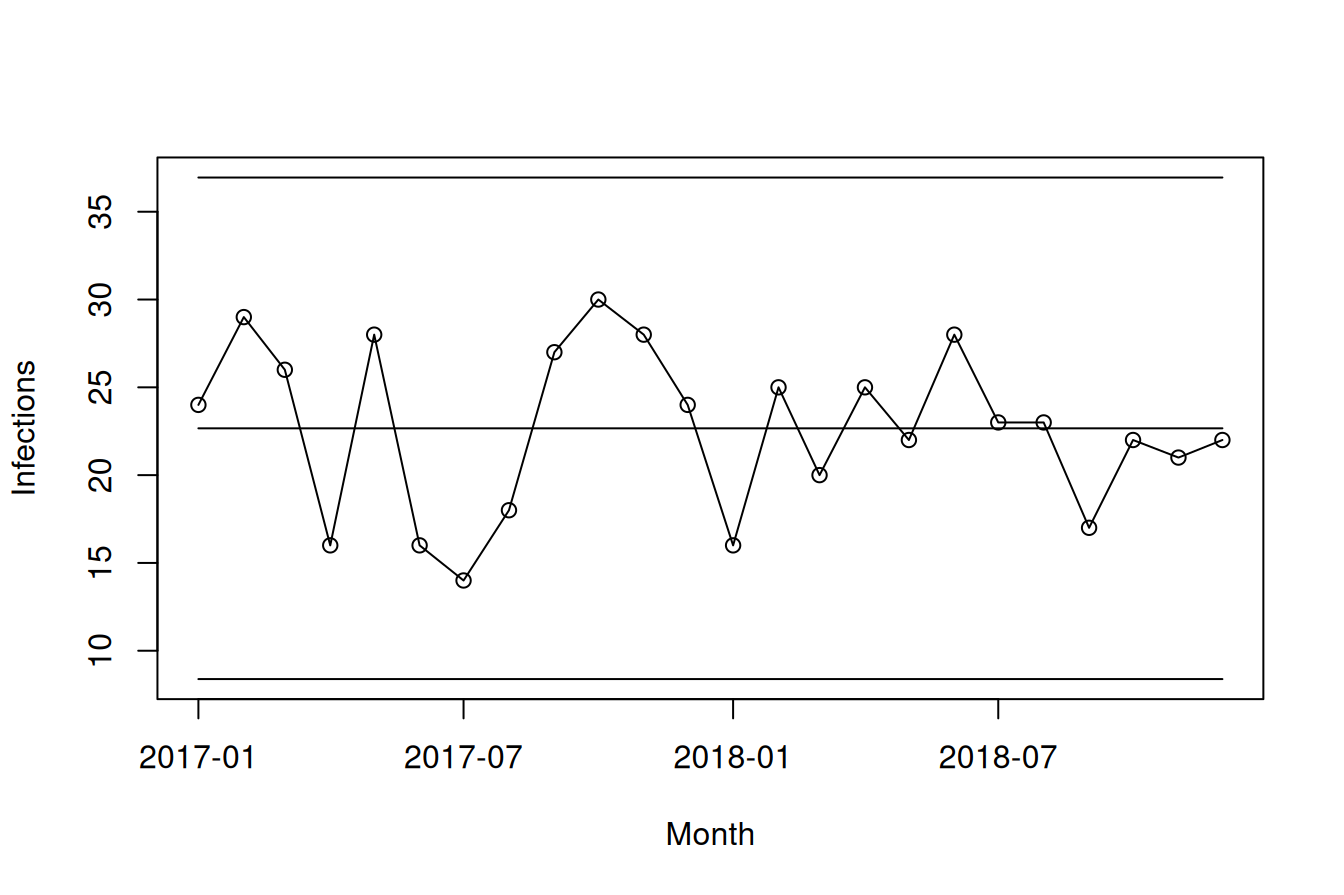
Figure 6.2: C chart of monthly numbers of hospital-acquired bacteremias
The average monthly number of infections is 22.7, and all data points fall within the control limits, which range from 8.4 to 36.9. If nothing changes, we should therefore expect future counts to be around 23, while recognising that from time to time values as low as 9 or as high as 36 may still occur as part of the natural variation in the process.
6.3.2 U chart
U charts are used when events are counted over subgroups of unequal size, resulting in unequal areas of opportunity (U for unequal). In our example, the number of patient-days may vary from month to month, so it makes sense to adjust for this by plotting rates rather than raw counts.
Because events are often rare relative to the area of opportunity, the resulting rates may be very small. It is therefore often helpful to multiply the rates by a constant before plotting. In Figure 6.3, we multiply by 10,000 to present infections per 10,000 risk-days rather than infections per day.
with(bact, {
  y   <- ha_infections / risk_days           # rates to plot
  cl  <- sum(ha_infections) / sum(risk_days) # overall mean rate, centre line
  s   <- sqrt(cl / risk_days)                # standard deviation
  lcl <- cl - 3 * s                          # lower control limit
  ucl <- cl + 3 * s                          # upper control limit

  # multiply y axis to present infections per 10,000 risk days
  multiply <- 10000
  y        <- y * multiply
  cl       <- cl * multiply
  lcl      <- lcl * multiply
  ucl      <- ucl * multiply

  spc(month, y, cl, lcl, ucl,
      ylab = 'Infections per 10,000 risk days',
      xlab = 'Month')
})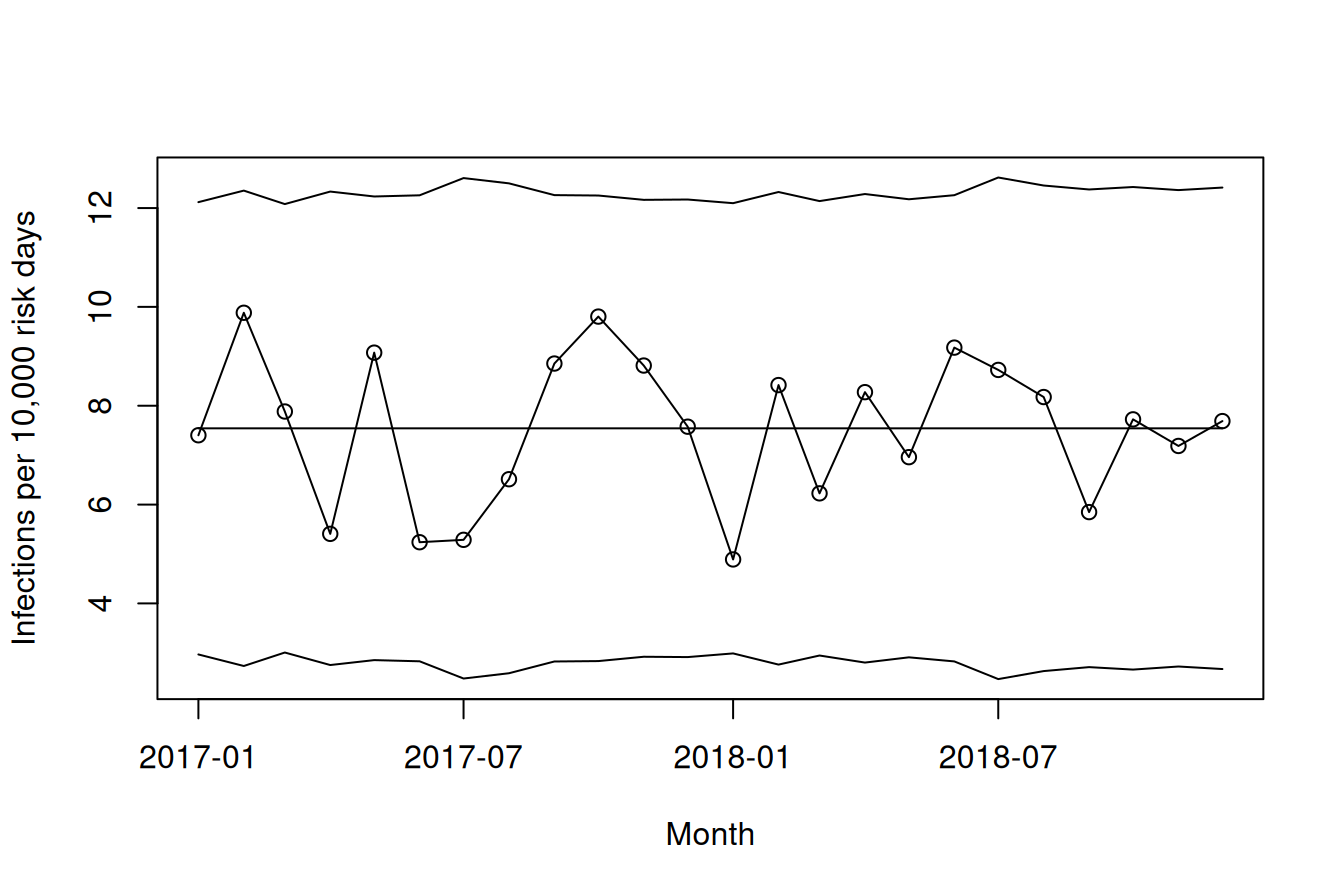
Figure 6.3: U chart of monthly number of infections per 10,000 risk days
The U chart in Figure 6.3 shows an average of 7.5 infections per 10,000 risk days, with all data points within control limits ranging from about 3.5 to 12. Unlike the C chart, the control limits vary from point to point because they depend on the denominator. Large denominators produce narrower limits, whereas small denominators produce wider ones.
In this example, the denominator varies only slightly between months, so the U chart adds little compared with the C chart. For pedagogical purposes, we may even prefer the C chart, because it is easier to relate to 23 infections per month than to 7.5 infections per 10,000 risk days.
6.3.3 P chart
P charts are used for proportions or percentages. Figure 6.4 shows the monthly percentage of patients with bacteremia who died within 30 days.
with(bact, {
  y   <- deaths / patients
  cl  <- sum(deaths) / sum(patients)      # process mean, centre line
  s   <- sqrt((cl * (1 - cl) / patients)) # process standard deviation
  lcl <- cl - 3 * s                       # lower control limit
  ucl <- cl + 3 * s                       # upper control limit

  # multiply by 100 to get percentages rather than proportions
  multiply <- 100
  y        <- y * multiply
  cl       <- cl * multiply
  lcl      <- lcl * multiply
  ucl      <- ucl * multiply

  spc(month, y, cl, lcl, ucl,
      ylab = '%',
      xlab = 'Month')
})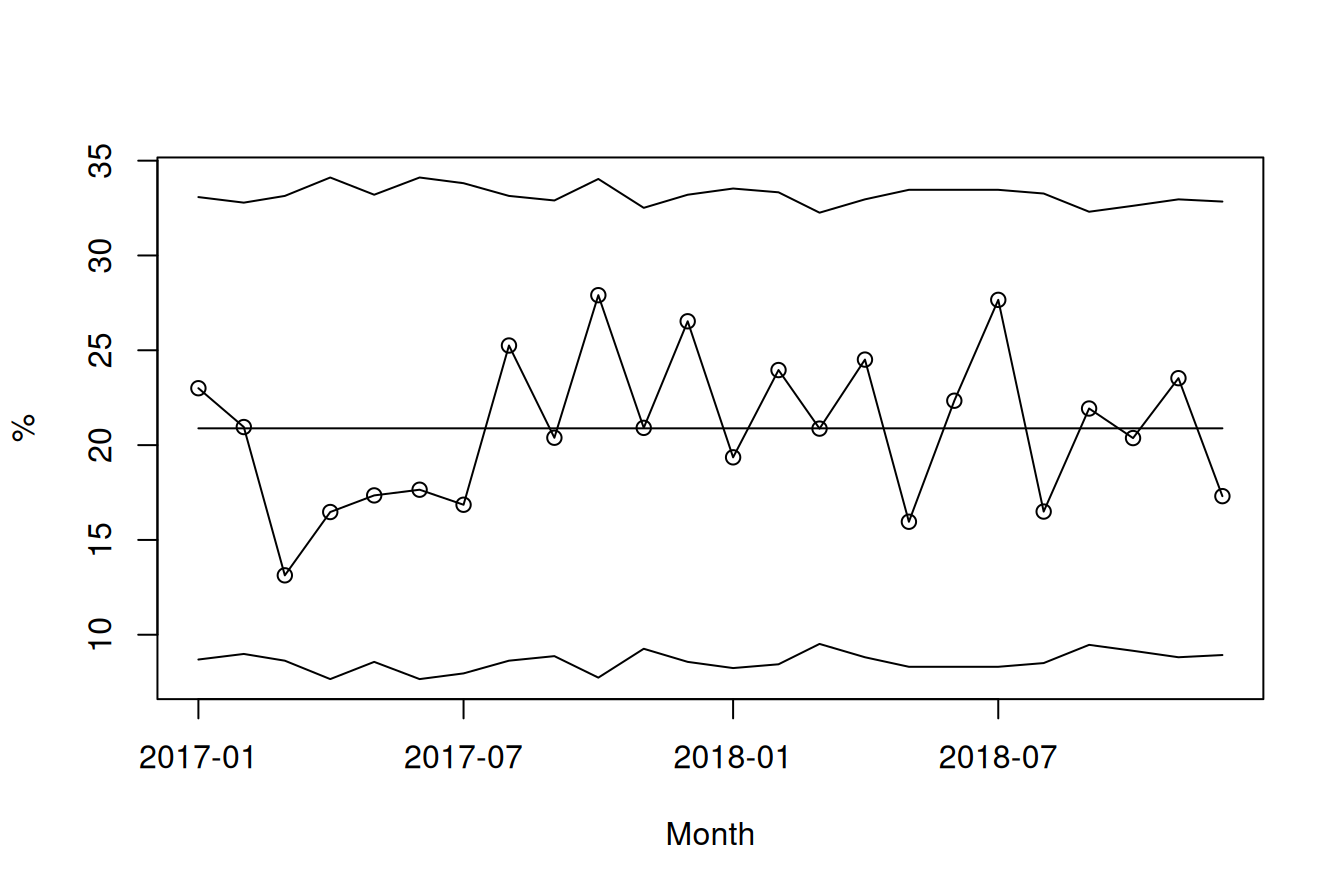
Figure 6.4: P chart of monthly 30-day mortality rates
The average mortality is 21%, and all data points fall within the control limits. As with the U chart, the control limits vary with the size of the denominator.
6.4 Measurement data
For this section, we use the Ceasearian section delay dataset on response times for 208 grade 2 caesarean sections, that is, the time in minutes from the decision to perform the caesarean section until the baby was delivered. The aim is to keep this delay below 30 minutes.
# read raw data
csect <- read.csv('data/csection_delay.csv',
                  comment.char = '#',
                  colClasses   = c('POSIXct',
                                   'Date',
                                   'integer'))

csect <- csect[order(csect$datetime), ]

# show the first 6 rows
head(csect)
## datetime month delay
## 1 2016-01-06 03:55:40 2016-01-01 22
## 2 2016-01-06 20:52:34 2016-01-01 22
## 3 2016-01-07 02:50:43 2016-01-01 29
## 4 2016-01-07 22:32:27 2016-01-01 28
## 5 2016-01-09 14:56:09 2016-01-01 22
## 6 2016-01-09 21:21:24 2016-01-01 206.4.1 I chart
The “I” in I chart stand for “individuals” because each subgroup consists of a single value. I charts are also often referred to as X charts.
They are useful when measurements are available for individual units, for example waiting times or blood pressure measurements for individual patients.
As we shall see later, the I chart is in fact useful for many types of data because it bases its estimate of variation on the actual variation observed in the data rather than on theoretical parameters from an assumed distribution. For this reason, the I chart is often described as the Swiss Army knife of SPC.
When subgroups consist of single values, we estimate within-subgroup variation using the average moving range, that is, the average absolute difference between neighbouring data points. Dividing this value by 1.128 gives an estimate of the process standard deviation. Equivalently, we may multiply the average moving range by (3 / 1.128 = 2.66) to obtain 3 standard deviations.
Let us look at the delay times for the most recent 60 caesarean sections (Figure 6.5).
with(tail(csect, 60), {
  xbar <- mean(delay)      # mean value, centre line
  mr   <- abs(diff(delay)) # moving ranges
  amr  <- mean(mr)         # average moving range
  s    <- amr / 1.128      # process standard deviation

  spc(delay,
      cl  = xbar,
      lcl = xbar - 3 * s,
      ucl = xbar + 3 * s)
})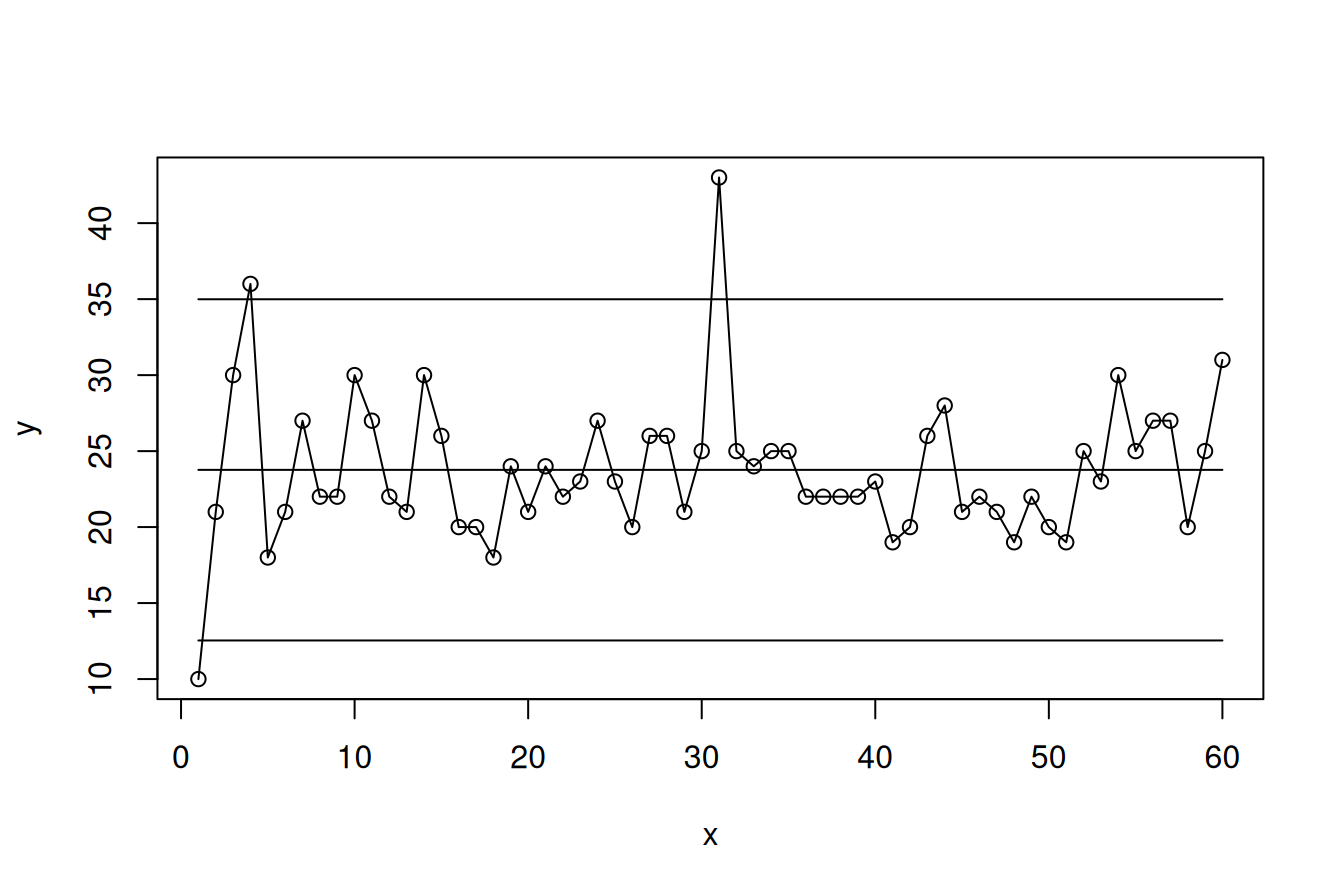
Figure 6.5: I-chart
The average delay for these cases is 24 minutes. Three data points fall outside the control limits (#1, #4, and #31), suggesting that these cases were unusual. It may therefore be useful to look more closely at what went particularly well in case #1 and less well in cases #4 and #31.
6.4.2 MR chart
The MR chart plots the moving ranges, that is, the absolute pairwise differences between neighbouring observations. It is a companion chart to the I chart. Because moving ranges can be zero but never negative, the MR chart has no lower control limit (Figure 6.6).
with(tail(csect, 60), {
  mr  <- c(NA, abs(diff(delay)))  # add NA in front to match the length of the I-chart
  amr <- mean(mr, na.rm = TRUE)

  spc(mr,
      cl  = amr,
      ucl = 3.267 * amr)
})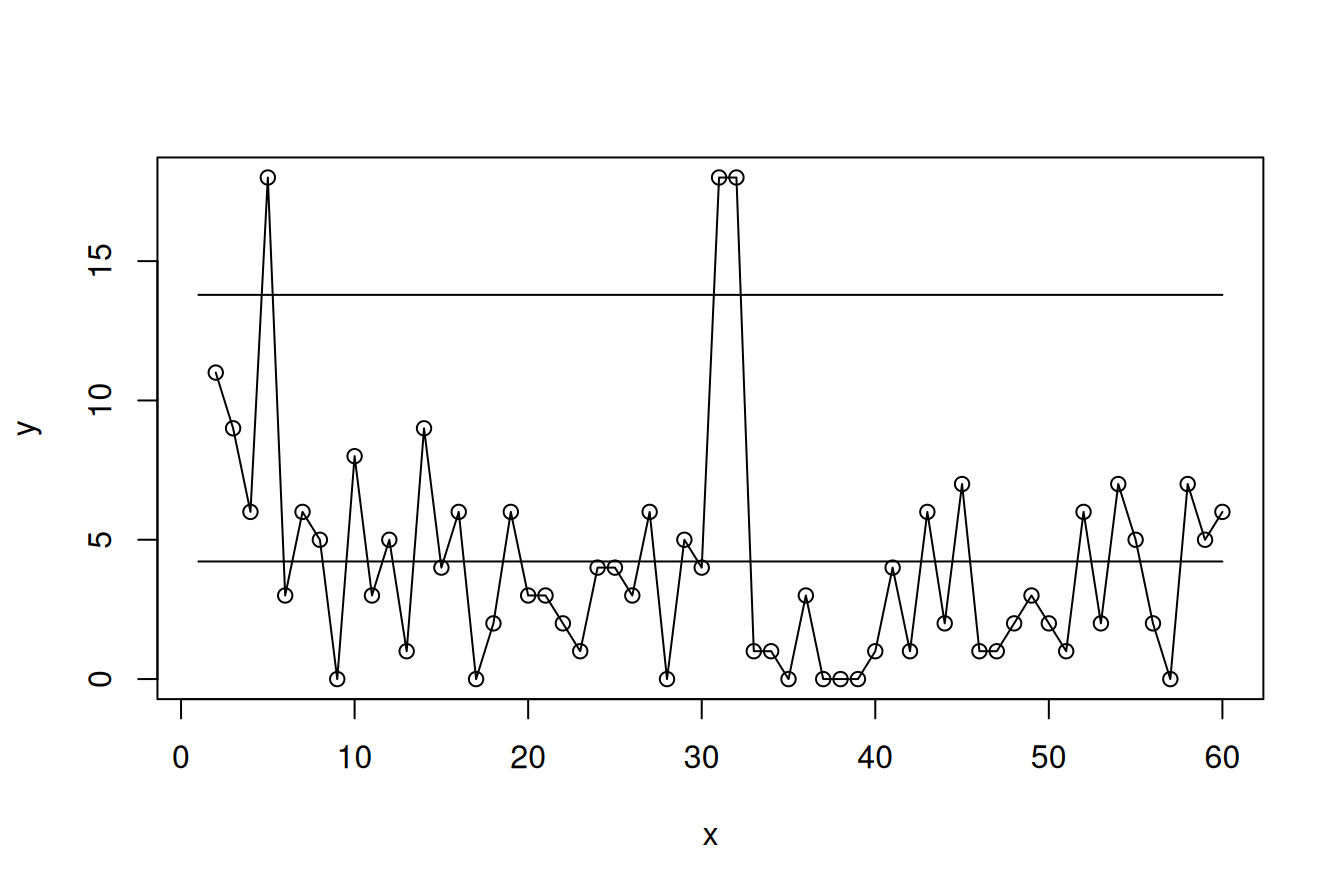
Figure 6.6: MR-chart
There is one fewer moving range than individual values. To keep the MR chart aligned with the I chart, we therefore insert an NA at the beginning.
The two charts may also be plotted together (Figure 6.7):
with(tail(csect, 60), {
  xbar <- mean(delay)
  mr   <- c(NA, abs(diff(delay)))
  amr  <- mean(mr, na.rm = TRUE)

  op <- par(mfrow = c(2, 1),           # setting up plotting area
            mar   = c(5, 5, 2, 1))
  spc(delay,
      cl   = xbar,
      lcl  = xbar - 2.66 * amr,
      ucl  = xbar + 2.66 * amr,
      main = 'I-chart',
      ylab = 'Delay (minutes)',
      xlab = '')

  spc(mr,
      cl   = amr,
      ucl  = 3.267 * amr,
      main = 'MR-chart',
      ylab = 'Moving range (minutes)',
      xlab = 'C-section #')
  par(op)                              # restoring plotting area
})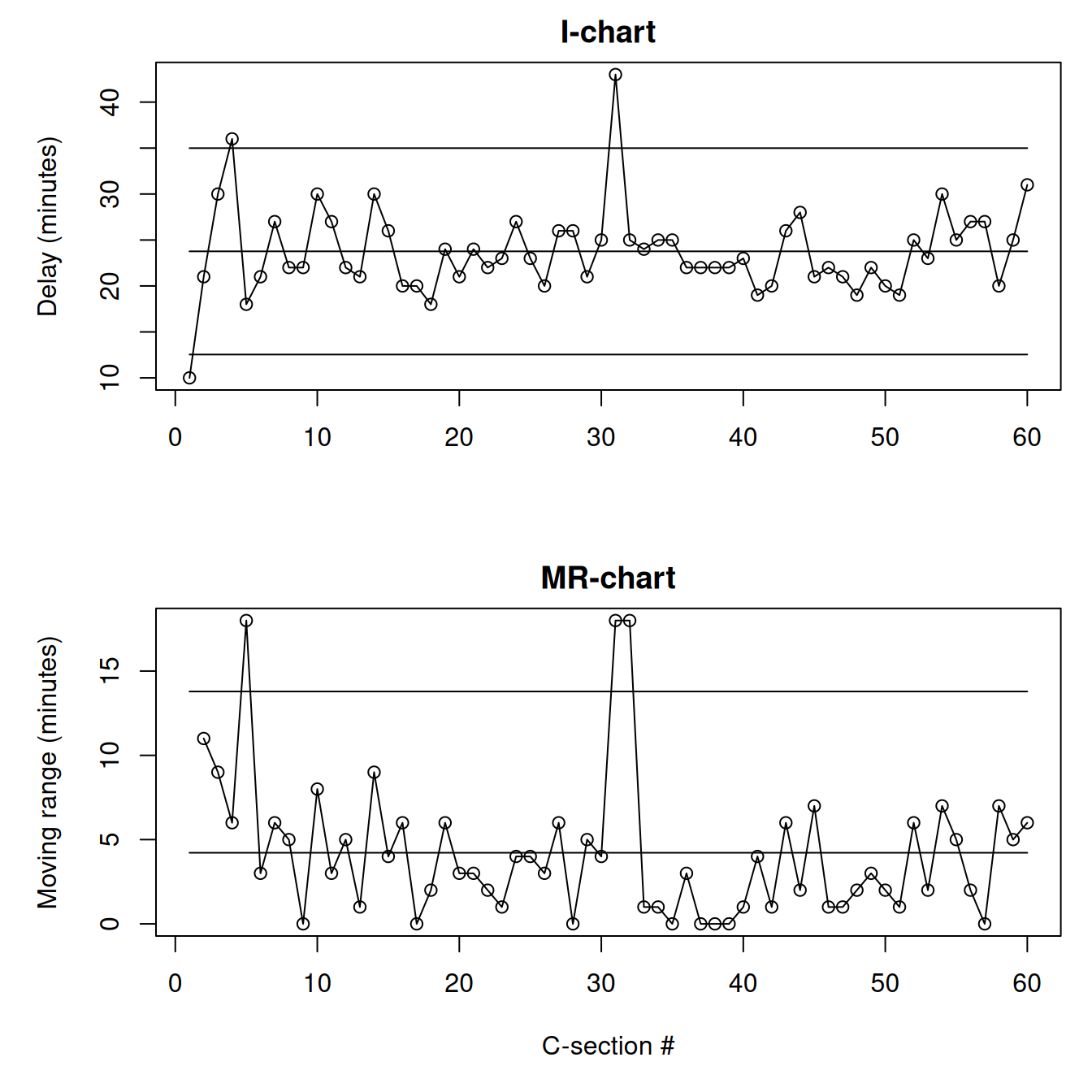
Figure 6.7: I- and MR-charts
The MR chart also identifies three data points outside the control limits. Two of these correspond to special causes identified on the I chart and strengthen the conclusion that these deliveries were unusual. Note that each point on the I chart, except the first and last, contributes to two moving ranges on the MR chart.
6.4.3 X-bar chart
The X-bar chart is appropriate when the subgroups consist of two or more measurements.
To construct a control chart of monthly average delay times, we first need to aggregate the data by month to obtain the subgroup mean, subgroup standard deviation, and subgroup size.
# split data frame by month
csect.agg <- split(csect, csect$month)

# aggregate data by month
csect.agg <- lapply(csect.agg, function(x) {
  data.frame(month = x$month[1],
             mean  = mean(x$delay),
             sd    = sd(x$delay),
             n     = nrow(x))
})

# put everything together again
csect.agg <- do.call(rbind, c(csect.agg, make.row.names = FALSE))

# print the first 6 rows
head(csect.agg)
## month mean sd n
## 1 2016-01-01 23.85714 3.387653 7
## 2 2016-02-01 24.45455 6.137811 11
## 3 2016-03-01 22.45455 6.638729 11
## 4 2016-04-01 22.66667 3.041381 9
## 5 2016-05-01 22.50000 3.891382 8
## 6 2016-06-01 22.00000 6.204837 5See the section on aggregating data frames in Appendix C for details of this split-apply-combine strategy.
Next, we calculate the centre line and the control limits using the formula in Table 6.1. Here \(\bar{\bar{x}}\) (x bar bar) is the weighted mean of the subgroup means, \(\bar{s}\) (s bar) is the weighted mean of the subgroup standard deviations, and \(A_3\) is a constant that depends on the subgroup size. The R code for calculating \(A_3\) and other constants is given at the end of the chapter.
With the aggregated data we can now construct the X-bar chart (Figure 6.8).
with(csect.agg, {
  xbarbar <- weighted.mean(mean, n)  # centre line
  sbar    <- weighted.mean(sd, n)    # process standard deviation
  a3      <- a3(n)                   # A3 constant

  spc(x   = month,
      y   = mean,
      cl  = xbarbar,
      lcl = xbarbar - a3 * sbar,
      ucl = xbarbar + a3 * sbar)
})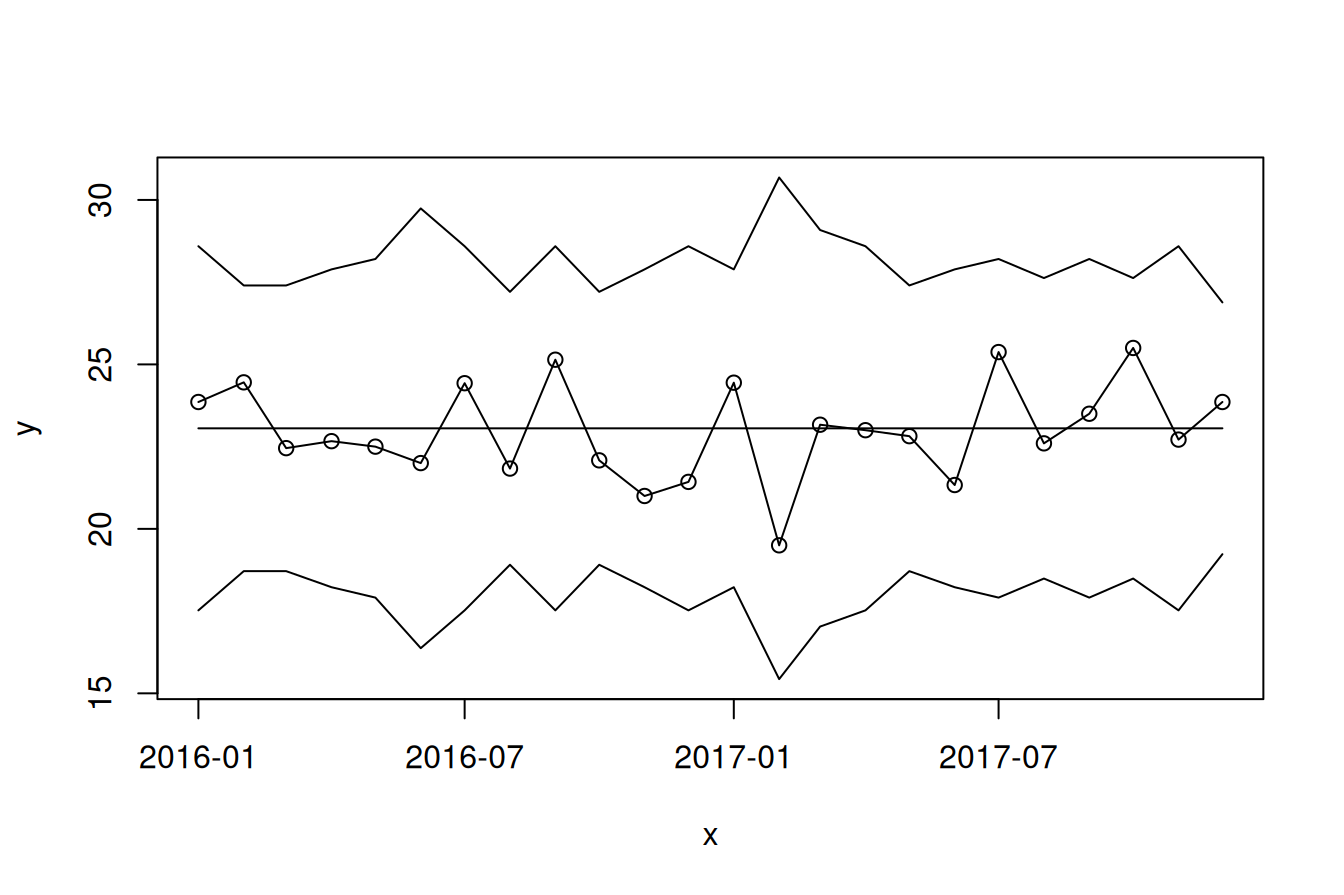
Figure 6.8: X bar chart
Figure 6.8 shows the average delay per month. The overall average delay is 23 minutes, and all data points fall within the control limits, suggesting that the process is stable and predictable.
As with U and P charts, the control limits vary from month to month because subgroup sizes vary. Small subgroups produce wider limits, while large subgroups produce narrower limits.
It is important not to conclude that everything is acceptable simply because no monthly average exceeds the target of 30 minutes. That target applies to individual cases, not to monthly averages. As the I chart already showed, individual cases may exceed the target even when the monthly means remain comfortably below it.
6.4.4 S chart
The S chart is usually plotted alongside the X-bar chart and shows within-subgroup variation. It is useful for detecting changes in the spread of the data over time.
To calculate the centre line and control limits for the S chart, we need the process standard deviation, \(\bar{S}\), together with the constants \(B_3\) and \(B_4\) from Table 6.1.
with(csect.agg, {
  sbar    <- weighted.mean(sd, n)  # pooled SD, centre line
  b3      <- b3(n)                 # B3 constant
  b4      <- b4(n)                 # B4 constant

  spc(x   = month,
      y   = sd,
      cl  = sbar,
      lcl = b3 * sbar,
      ucl = b4 * sbar)
})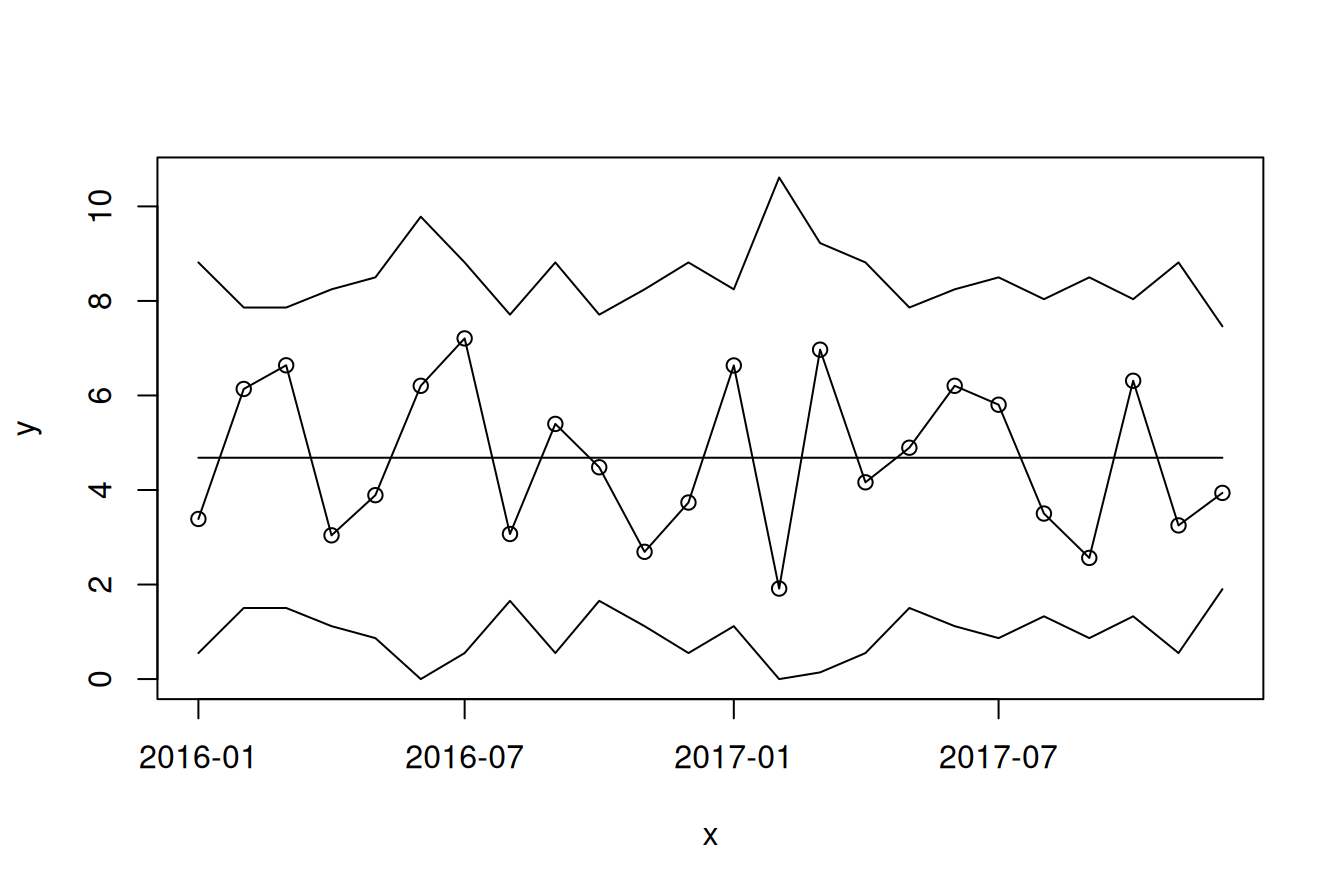
Figure 6.9: S chart
Figure 6.9 shows the monthly standard deviations of delay times. The average standard deviation is 4.7 minutes, and all points lie within the control limits.
We may also plot the X-bar and S charts together (Figure 6.10):
with(csect.agg, {
  xbarbar <- weighted.mean(mean, n)  # pooled average
  sbar    <- weighted.mean(sd, n)    # pooled standard deviation
  a3      <- a3(n)                   # A3 constant
  b3      <- b3(n)                   # B3 constant
  b4      <- b4(n)                   # B4 constant

  op <- par(mfrow = c(2, 1),
            mar   = c(3, 5, 2, 1))
  spc(month, mean,
      cl   = xbarbar,
      lcl  = xbarbar - a3 * sbar,
      ucl  = xbarbar + a3 * sbar,
      main = 'X-bar Chart',
      xlab = '')

  spc(month, sd,
      cl   = sbar,
      lcl  = b3 * sbar,
      ucl  = b4 * sbar,
      main = 'S chart',
      xlab = '')
  par(op)
})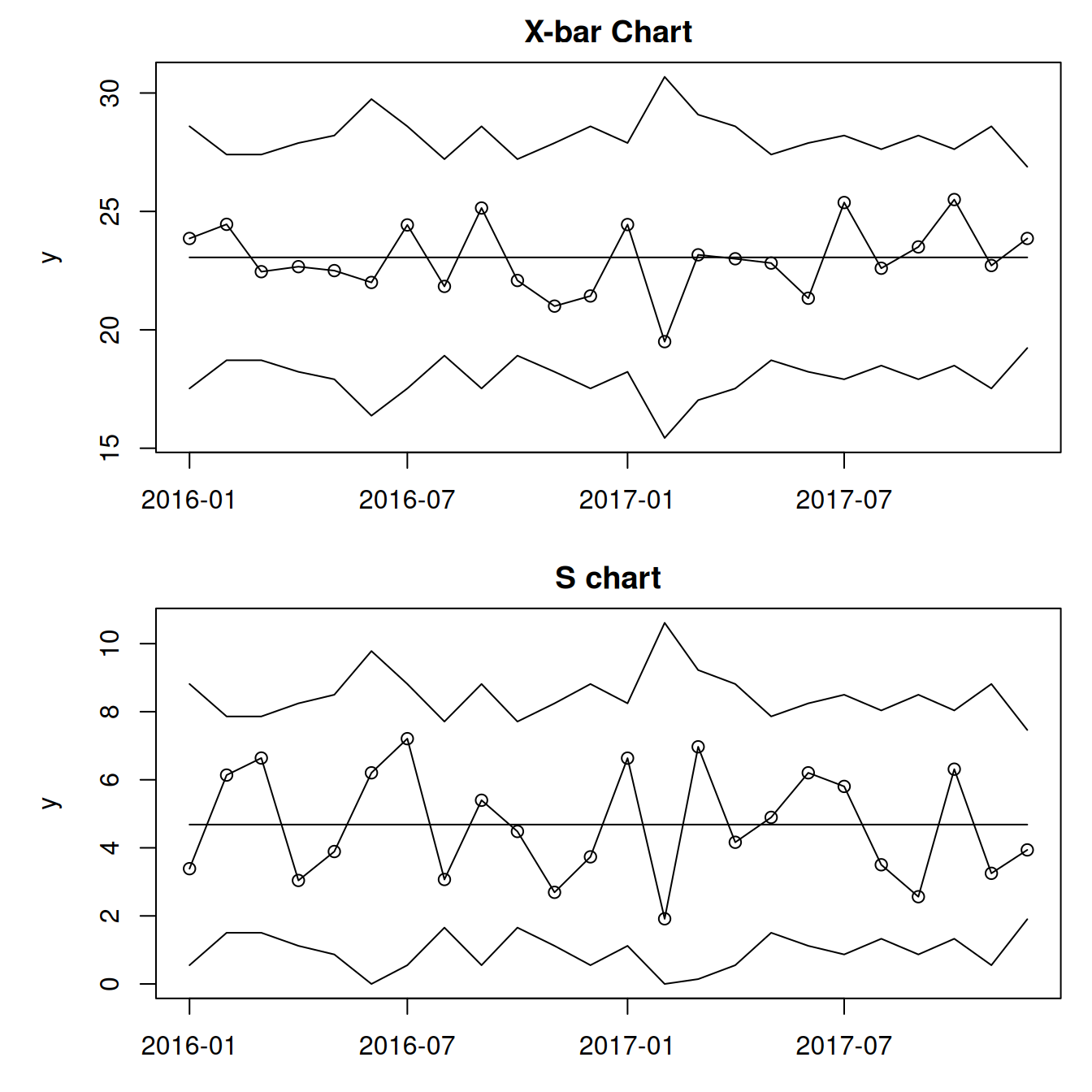
Figure 6.10: X-bar and S charts
6.5 Control limits in short
Control limits are intended to estimate the boundaries of natural common cause variation. They are placed three standard deviations above and below the centre line, which is usually the mean or weighted mean of the subgroup means.
The exact calculation depends on the type of data and the type of chart, but the interpretation remains the same regardless of chart type.
In the next chapter, we improve our plots by adding visual cues that highlight signs of non-random variation in the data.